A 24′ deckover trailer goes out of an unstaffed yard and comes back, and no member of staff is present for either. The renter books online, drives to the gate, takes a $250 hold on their own card, presses one button, and the lockbox code arrives by email. The order status is the gate, and the renter is the one who moves it.
ORDER
#28943
RENTER
Ray Delgado
TRAILER
24′ Deckover
OUT
Wed 23 Sep, 09:00
BACK
Sat 26 Sep, 09:00
LOCKBOX
2908
An unstaffed yard is the hardest version of equipment rental to run, because every safeguard a counter normally provides has to be replaced by something that works at 6am on a Sunday with nobody there. Has this person paid? Have they signed? Is there a deposit against the trailer walking off? And the one that decides whether the whole thing is possible at all: who gives them the code to the lockbox, and when?
Reservety’s answer is deliberately small. There is no separate “unattended mode”. The order status is the gate, the renter moves it themselves with a button that says what they are doing, and the code is released by the same status-gated email machinery the shop already uses. Two rows of configuration describe an entire rental.
This page follows one hire — order #28943 — from booking to return. Every figure is a screenshot taken while it was happening.
PART 00
The whole idea
One table. Everything else in this guide is a consequence of it.
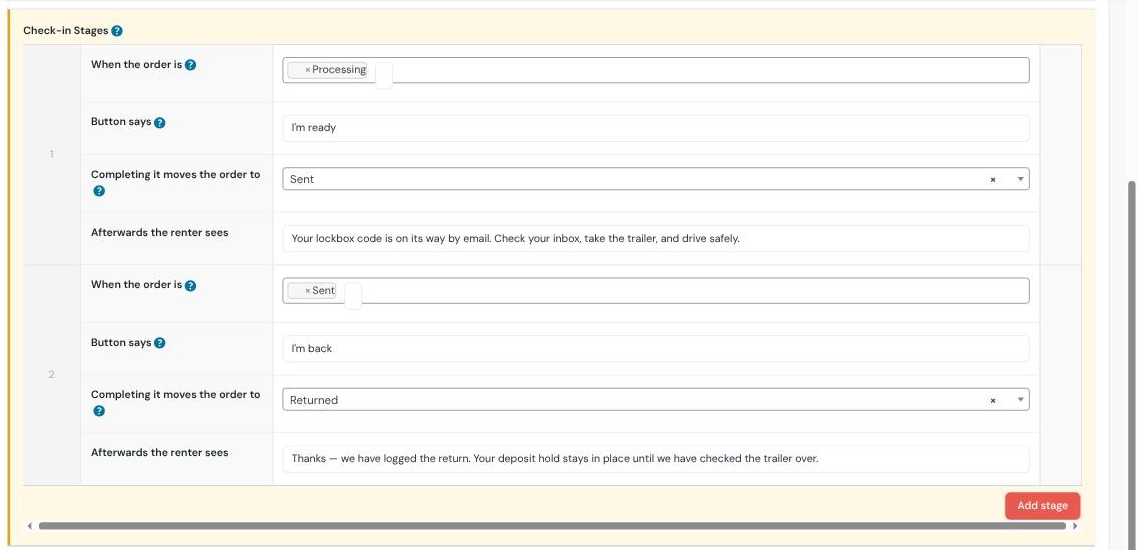
Nobody is at the yard, so the order status is the gate and the customer moves it themselves. Two rows in the check-in stages repeater describe a whole rental:
When the status is
Button says
Promotes to
Processing
I’m ready
Sent
Sent
I’m back
Returned
Why this shape. The renter never picks a status — they press a button that names what they are doing, and the row decides where that leads. The same screen is the pickup screen and the return screen; which one it is depends entirely on where the order already is. Add no rows and nothing promotes: the feature degrades to an ordinary staffed check-in.
PART 01
Two rows and a code
The configuration in full. It took about five minutes.
1.1 A lockbox code on each trailer
Every trailer carries its own mechanical lockbox, so the code lives on the product. This yard has three: 4417 on the telescopic dump trailer, 2908 on the 24′ Monster Ramps deckover, 7325 on the deckover with chains and binders.
Manual lockbox code. The smart-lock field underneath is empty — this yard has mechanical boxes, and the manual code deliberately is not gated on having a smart-lock API key.
The field says it itself. “This code is a lasting secret. Unlike a smart-lock code it is not time-boxed: once a renter has seen it they can use it again, and so can anyone they pass it to. Change it on this product whenever you change the box.” A mechanical box is not a smart lock and the software does not pretend otherwise.
1.2 The two rows
Each row has four parts: which status it applies to, what the button says, where completing it sends the order, and what the renter reads afterwards. That last field is worth spending a minute on — at an unstaffed yard it is the only instruction anybody gets.
The whole rental, configured. Row 1 turns Processing into Sent; row 2 turns Sent into Returned. On this site those two statuses are displayed as “Sent” and “Returned”.
1.3 The email that carries the code
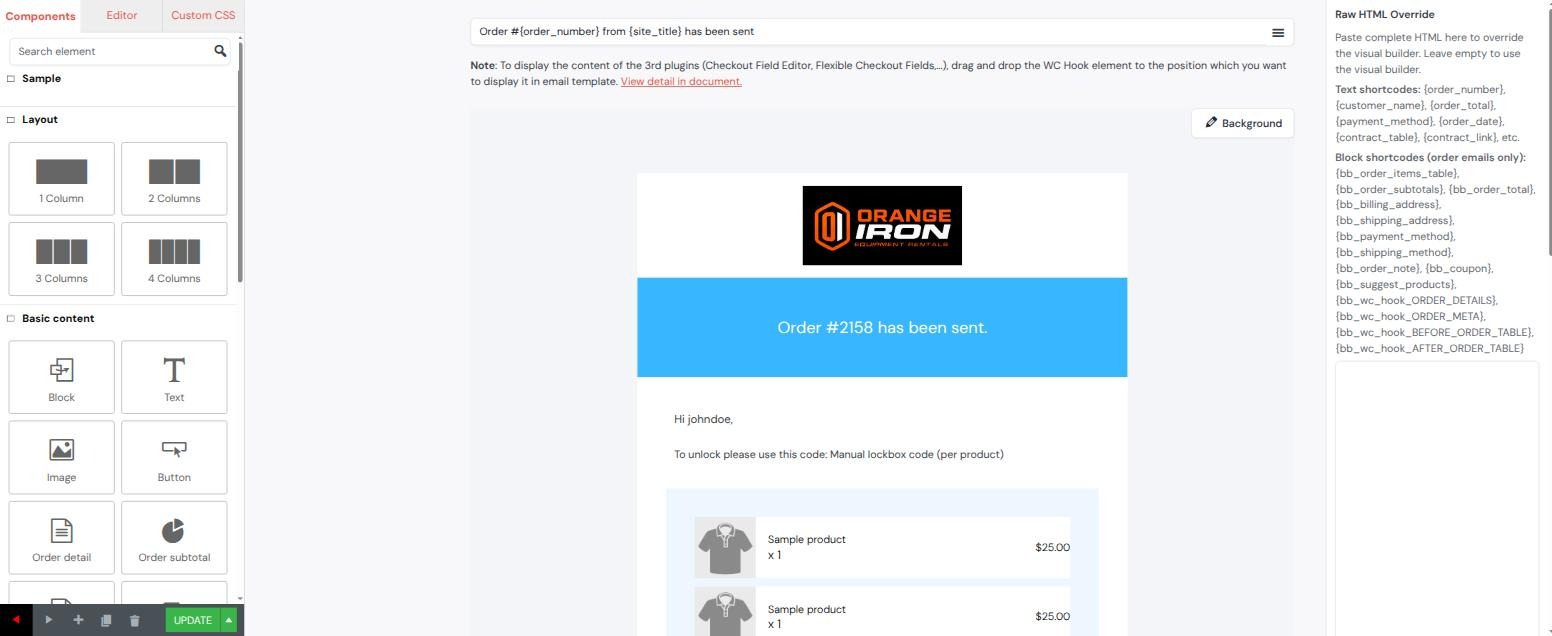
Nothing bespoke here either. The code rides in the shop’s existing Order check-out (send) template, through a merge tag, alongside whatever else the shop already tells people at pickup.
One line in an ordinary template.To unlock please use this code: {manual_access_code}. The tag resolves to the codes of the products actually on that order, so a renter is never sent the code to a trailer they did not book.
PART 02
The setting that leaks codes
The one piece of this that is genuinely dangerous to get wrong, and nothing validates it for you.
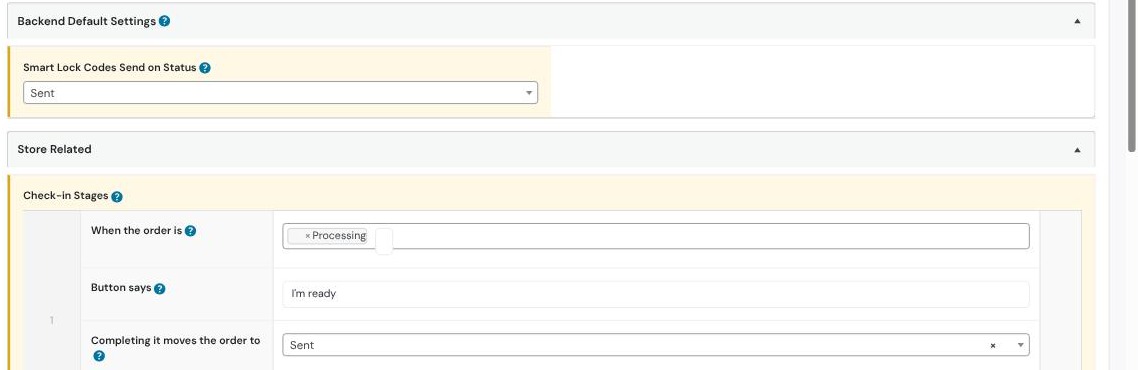
{manual_access_code} only resolves while the order sits at one particular status — the one named in Smart Lock Codes Send on Status. At any other status the tag renders empty. That is the safety catch: it is what stops the code going out in the booking confirmation.
So the pickup row’s destination and that setting have to be the same status. On this site both are Sent. Out of the box the setting said Processing — which is the status an order reaches the moment it is paid for. Left alone, every renter would have received their lockbox code in the checkout email, days before arriving, and so would anyone who ever placed an order.
These two must agree. The send status (top) and the status the pickup row promotes to (below) are both Sent. Nothing in the software checks this for you; a mismatch fails silently in one of two directions — codes too early, or no code at all.
If you change one, change both. Point the pickup row somewhere new and the code stops arriving. Point the send status somewhere earlier and the code starts arriving early. The renter is standing at a locked gate in the first case and nobody finds out about the second until it has already happened.
PART 03
The renter books
Ordinary online booking. Nothing about the yard being unstaffed shows up yet.
3.1 Dates and times, against live availability
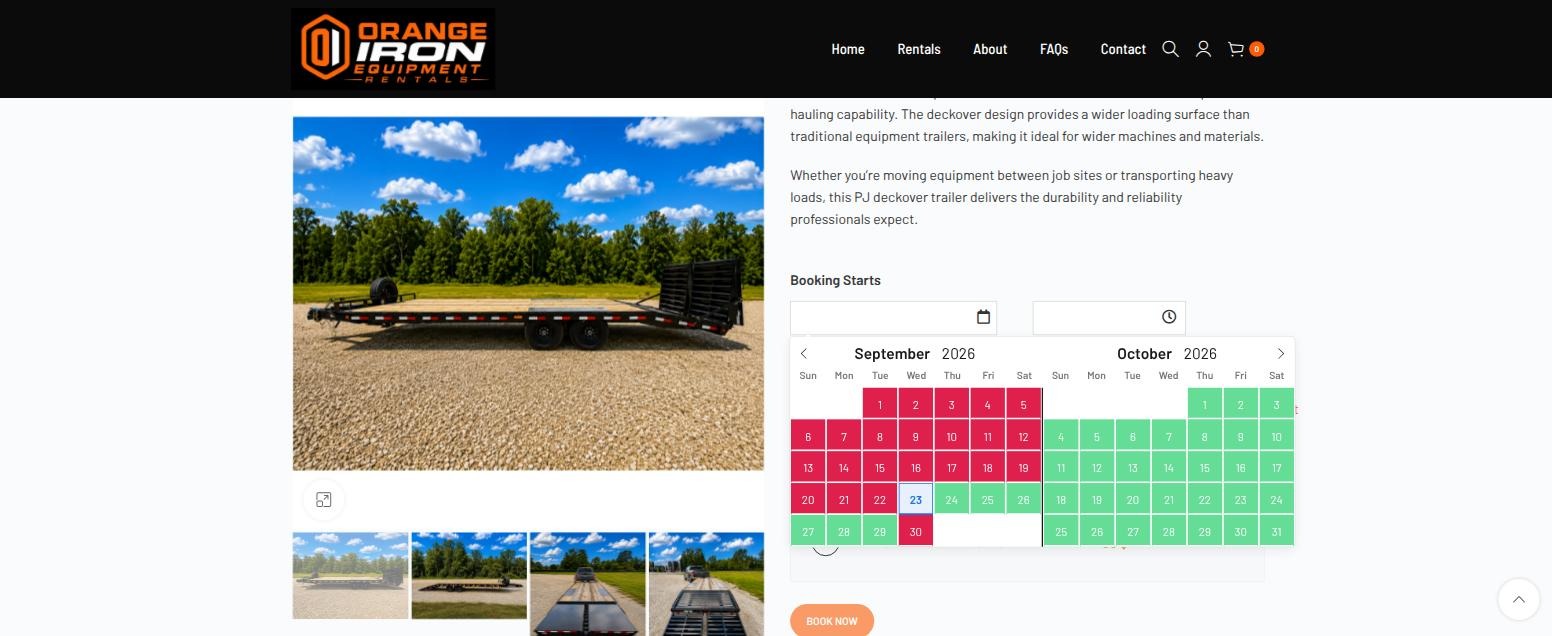
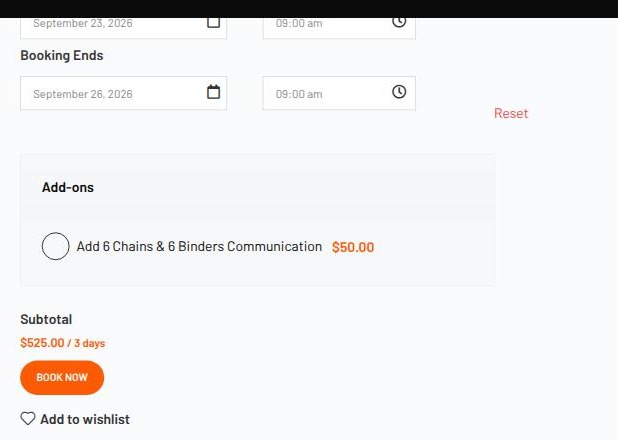
Three days, Wednesday to Saturday. Green is a free day, red is taken. The yard also runs pickup and drop-off time slots, so the renter picks 09:00 at both ends.$525.00 / 3 days. The optional chains-and-binders add-on is left unticked.
3.2 Paid in full, deposit declared separately
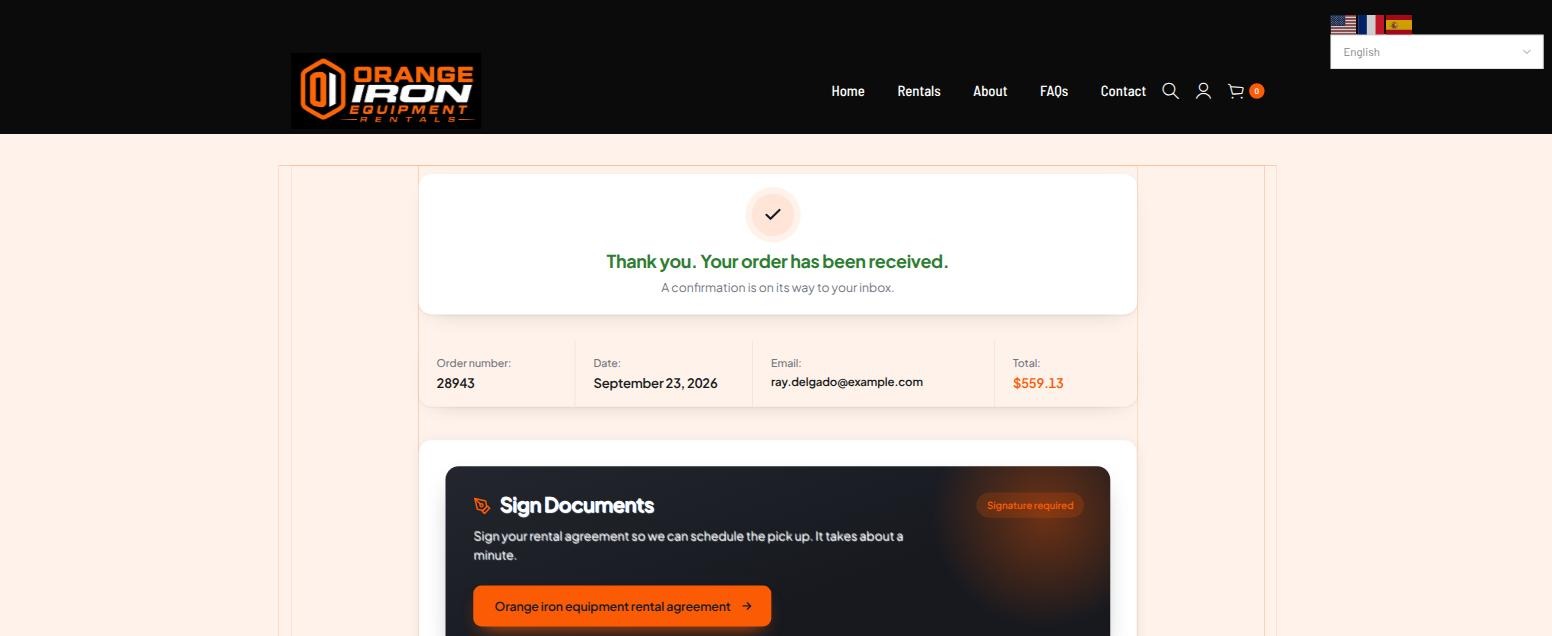
$525 plus $34.13 tax comes to $559.13, taken at checkout. The $250 security deposit is shown but not charged — it is a hold, and it does not happen until the renter is actually at the yard.
Order #28943. The rental agreement is offered here and the renter skips it — which is the interesting case, because it means the yard screen has to collect it later.
PART 04
At the gate
Wednesday, 9am. The yard is empty. There is a sign on the gate with a code on it.
4.1 One page, two doors
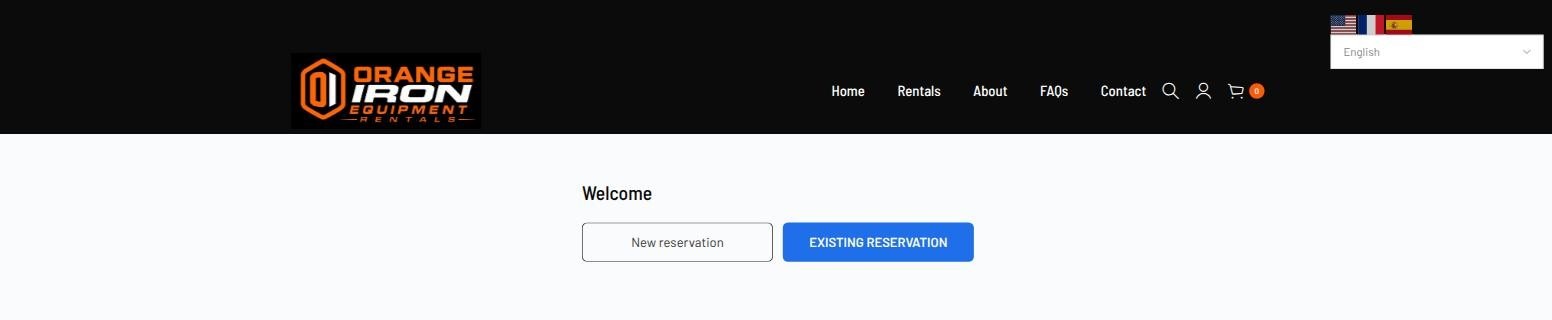
The sign on the gate. It encodes the page address and nothing else, so it never expires and carries no customer data.Yard check-in.New reservation goes to the ordinary shop for anyone turning up on spec; Ray has a booking, so he takes the other door.
4.2 Order number plus the contact on the booking
Two fields, no login. The email or phone has to match the booking. Everything that fails before that check gives one identical message, so the screen cannot be used to probe for valid order numbers.
4.3 What is still outstanding
Status Processing, paid in full. Two things are outstanding: the agreement he skipped at checkout, and the deposit hold. The button at the bottom already reads I’m ready — that is row 1 of the table, chosen because the order is at Processing.
PART 05
The deposit hold
A hold, taken by the renter, on their own card, standing at the gate.
“This is a temporary hold on your card, not a payment.” Requiring the hold before pickup is a per-site switch; with it off, the step does not appear at all and the deposit stays a staff action.
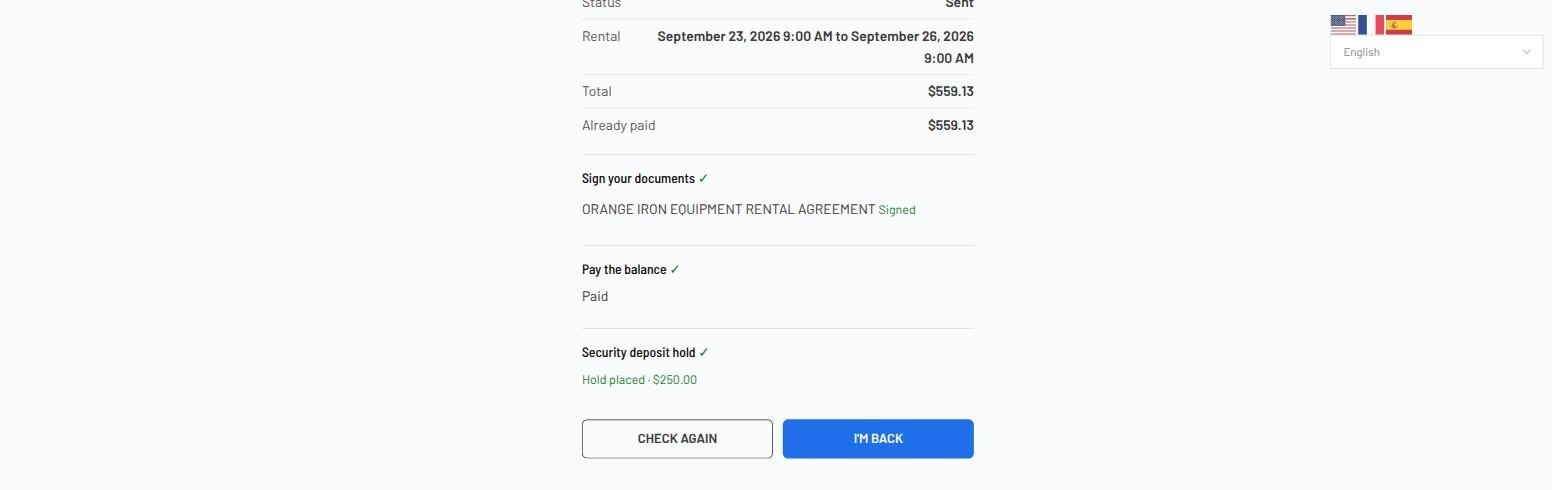
He signs the agreement on his phone at the same time. With all three items cleared, the button comes alive.
Signed, paid, held.Hold placed · $250.00. Until every line is green the promotion button stays disabled — which is the whole safeguard, because the button is what releases the code.
PART 06
“I’m ready”
One press. Three things happen, none of which needs a member of staff.
The order is promoted Processing → Sent. Reaching Sent is what authorises the security deposit, and reaching Sent is what makes {manual_access_code} resolve. The renter is told what to expect in the words the yard chose.
The row’s own message. “Your lockbox code is on its way by email. Check your inbox, take the trailer, and drive safely.” That sentence is the fourth field of row 1 — the only instruction anybody gives at an empty yard.Status: Sent. Looked up again a moment later, from the same page, by the same renter.
PART 07
The code email
The thing the whole arrangement exists to produce.
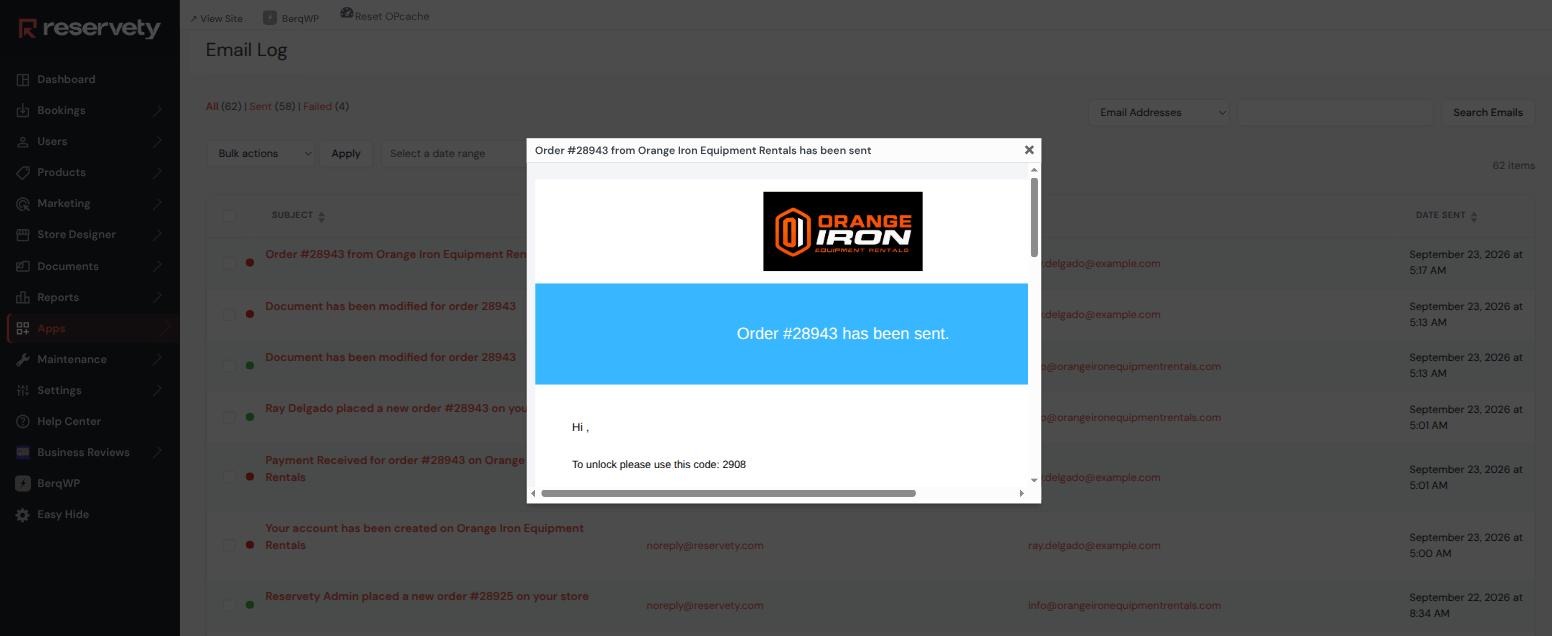
“To unlock please use this code: 2908”. That is the code set on the 24′ Monster Ramps deckover — the trailer on this order — and not the 4417 or 7325 belonging to the other two. The tag resolved per product, at the moment the order reached Sent, and not before.
About this screenshot. It is the mail log’s rendering of the message that was actually generated and queued. The log marks it not sent, because the renter in this run is fictional and their address is on a reserved, deliberately undeliverable domain. The composition, the gating and the code are real; the delivery is the one part this demo could not exercise.
The sequence matters more than the screenshot. The code did not exist in any email the renter could read until they were physically at the gate with a signed agreement, a paid balance and a live deposit hold. Nothing about that ordering is enforced by a person.
PART 08
“I’m back”
Saturday morning. Still nobody at the yard.
Ray drops the trailer, puts the key back in the box, and opens the same page from the same sign. He is not asked to choose anything, and there is no second screen to find.
The same screen, a different button. Because the order now sits at Sent, row 2 applies and the button reads I’m back. This is the clearest demonstration of the whole design: nothing was reconfigured between these two screenshots except the order’s status.And the return message sets expectations. “Your deposit hold stays in place until we have checked the trailer over.” Said plainly, at the moment the renter walks away, rather than in a policy document.
PART 09
The deposit waits for a human
The one thing in this flow the renter deliberately cannot finish.
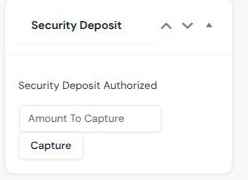
Pressing I’m back moves the order to Returned and logs the return. It does not touch the money. The hold stays authorised on the card until the owner walks out to the trailer, looks at it, and decides — release it, or charge some of it for damage, fuel or a late return.
Still authorised, still the owner’s call. The trailer is back and the rental is closed, and the $250 is untouched. Nothing in the unattended flow can release or charge it.
This is the deliberate asymmetry in the design. A renter is trusted to say “I have arrived” and “I have returned it”, because both are easy to verify afterwards and neither moves money on its own. Deciding whether a trailer came back in acceptable condition is a judgement, it costs the renter real money, and so it stays with the person who owns the trailer.
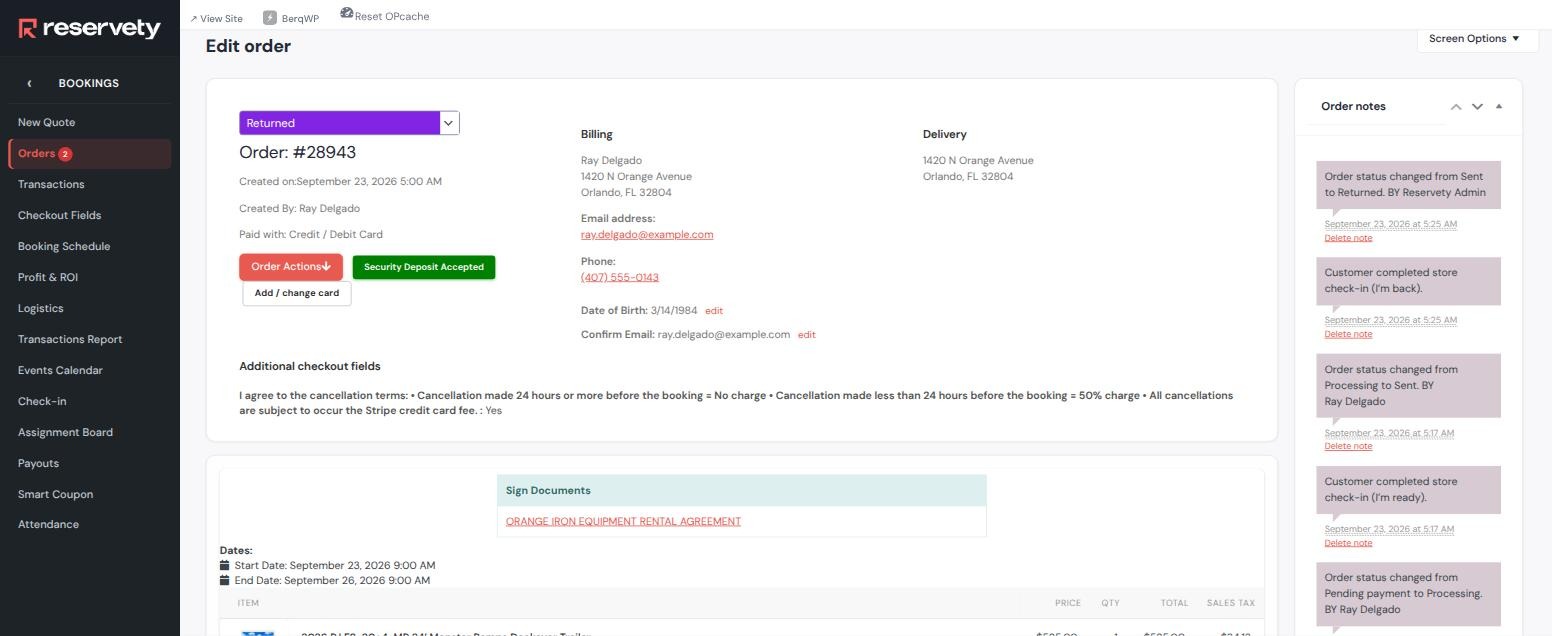
The whole hire in five notes. Pending payment → Processing, Customer completed store check-in (I’m ready), Processing → Sent, Customer completed store check-in (I’m back), Sent → Returned. Each press is recorded separately from the status change it caused.
PART 10
What this proves
One trailer, three days, nobody on site.
An empty yard that still has rules
The status is the gate. Two rows describe a whole rental, and the renter moves the order by pressing a button that names what they are doing.
The code cannot go out early.{manual_access_code} resolves only at the send status, and the send status is the one the pickup row promotes to. Get those two out of step and it fails loudly in one direction and silently in the other — which is exactly why it is worth checking.
The code is per trailer. The renter of the deckover got 2908 and could not have been sent 4417 or 7325.
Nothing is released until everything is clear. Agreement signed, balance paid, deposit held — the promotion button stays dead until all three are green.
The renter takes their own deposit hold. On their own card, at the gate, with the screen saying plainly that it is a hold and not a payment.
The money stays with the owner. “I’m back” closes the rental and logs the return. Releasing or charging the $250 is a human decision, made after somebody has actually looked at the trailer.
It reads back. Five order notes, both presses, both promotions, an authorised hold and a signed agreement with the renter’s uploads attached.
Built on the Orange Iron Equipment Rentals staging site with the payment gateway in test mode. Order #28943 is a real order taken through that gateway; the renter, e-mail address and phone number are fictional and use reserved ranges, which is why the code email is logged as generated but not delivered. Every screenshot is the running system, unretouched.
Start Your Rental Business the Right Way
Reservety handles your website, bookings, inventory, and payments — so you can focus on growing your business.