
A driver needs four things: what is on the van, where it goes, in what order, and a way to say it arrived. Everything else is somebody else’s screen. This is what a delivery driver signs into.
The office view of a delivery is a row in a list. The driver’s view is a windscreen, a postcode and a trailer on the back. The driver app is deliberately small: it shows the run, and it takes the two or three answers only the person standing at the kerbside can give.
Drivers sign in with their own account and see only their own work. Everything below is the running system, photographed as it is.
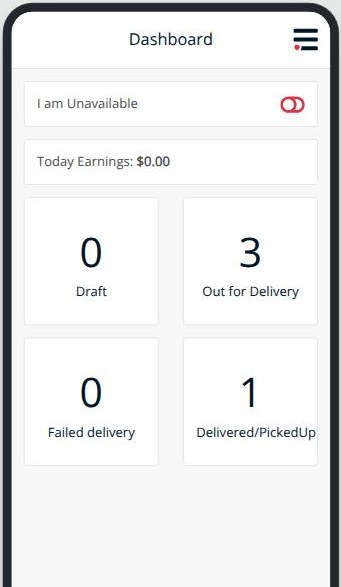
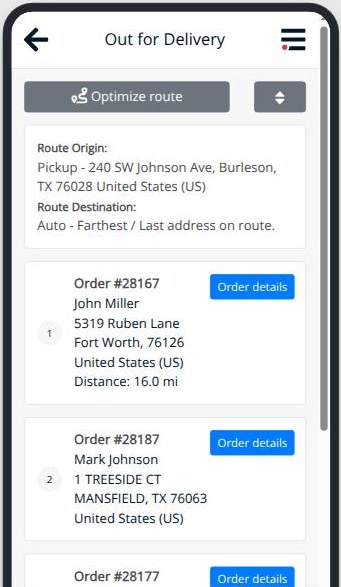
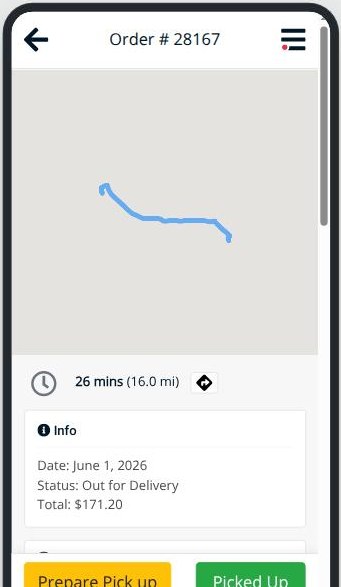
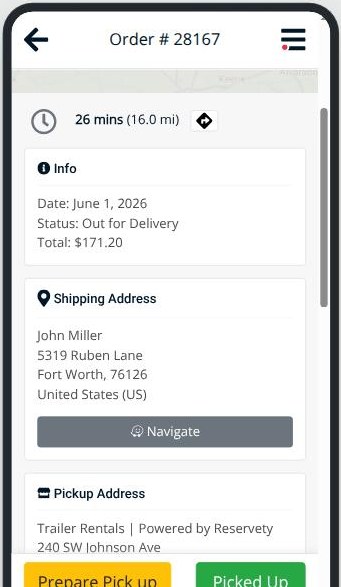
In the order a driver meets them: what is on today, where it goes, how far away it is, and the buttons that close a stop.
The driver is not filling in a log for somebody to read later. Each answer is the thing that moves the order.
One trailer, one morning, from the yard gate to the last drop. Nobody rings the office to report any of it.
The driver switches themselves to available. Until they do, dispatch will not hand them work.
Three stops, reordered from the depot in one tap. The last drop is wherever the run leaves them.
Navigate opens the phone’s own maps at that address. Nothing is re-typed into a second app.
One button. The order moves on for the office and for the customer at the same moment.
A failed delivery is a state, not a silence. It is on the dashboard count before the van is back.
Availability goes back off. Tomorrow’s dispatch already knows not to load them.
A hire that ends is a stop like any other. The order carries a pickup address as well as a delivery one, and the bottom bar offers the collection answers instead — prepare the pick up, then confirm it is on the van. The driver does not change app, and the yard does not have to guess whether the trailer came back.
Everything a driver is given, they need at the kerbside. Everything else belongs to somebody at a desk, and putting it on this screen would only slow the run down.
The point. The proof of delivery is not a separate piece of paperwork that somebody types up afterwards. It is the same tap that told the driver’s own screen the stop was finished, and it lands on the order everyone else is already looking at.
Screenshots are of the running system, unretouched. Phone frames are the real app rendered at phone width.
Reservety handles your website, bookings, inventory, and payments — so you can focus on growing your business.