Five children’s classes of six, a wedding couple learning their first dance, ballroom privates, four rooms and a winter showcase. This page follows one week of Maple Street Dance Studio in Reservety: the classes made once, parents registering and paying the month, a teacher’s day off covered, Studio B rented to a choreographer for a Tuesday evening, attendance and cash on the teacher’s phone, the family that has not paid October, and tickets for the showcase.
THE WEEK
Oct 12–18, 2026
CLASSES
Ballet, hip-hop, contemporary
PLACES
Six per class
TEACHERS
Sarah, Daniel, Emily
ROOMS
Studio A, B, C, Main Studio
THE APP
/bb-app/
A dance studio’s week is the same every week until it isn’t: the same classes at the same hours, a teacher who is off on Thursday, a room someone wants to rent, a new child on Wednesday, parents who need to know when and where, tuition due on the first, and in December, the showcase.
Reservety keeps that week on one screen, Trainer week. A class is a group with six places that repeats every week, with a teacher and a room. A couple learning their wedding dance is the same thing with two places. Each child has a wallet: the family pays the month on the 1st, by card, cash or bank, and every class the child attends is taken from it at the studio’s hourly rate. Teachers have an app on their phone with their week and the class list.
The studio here is Maple Street Dance Studio in Raleigh, North Carolina, on a test copy of a Reservety site, during the week of October 12, 2026. The first class was made on the screen exactly as shown; the other four classes, the families and their payments since September were seeded through the same code the screens use. Classes and studios are on Reservety’s Professional plan, $99 a month. Setting the studio up, from the teachers to the hourly rate, is its own guide: Classes: set it up once; renting Studio B by the hour is in Courts and rooms by the hour.
PART 00
The whole idea
Who does what, in one table.
The owner builds the term once. After that the week runs itself: classes repeat, teachers see their own hours, parents get the schedule and a reminder, and each child’s wallet keeps the score.
A class
6 places, weekly, a teacher, a room
A wedding couple
a class with 2 places, $45 an hour each
A ballroom or couple lesson
a booking for a teacher’s hour, online or by phone
What a class costs a family
$18 an hour from the child’s wallet
How families pay
the month on the 1st, card, cash or bank
What a teacher is paid
$30 per class taught
The showcase
an event with child and adult tickets
Studio B
held by the classes; rented by the hour when free
PART 01
First week: the classes
Three steps, done once at the start of the term. The teachers, the rooms and the private lessons are already set up, as in Classes: set it up once: under Staff (Employees in the Full menu) Sarah Mitchell, the owner, who teaches ballroom and the couples, Daniel Cruz (hip-hop) and Emily Chen (ballet and contemporary); under Resources Studio A, B and C and the Main Studio; under Services a private lesson at $85 and a couple lesson at $110.
1. Monday at 4 pm: a name, the places, the days, the teacher
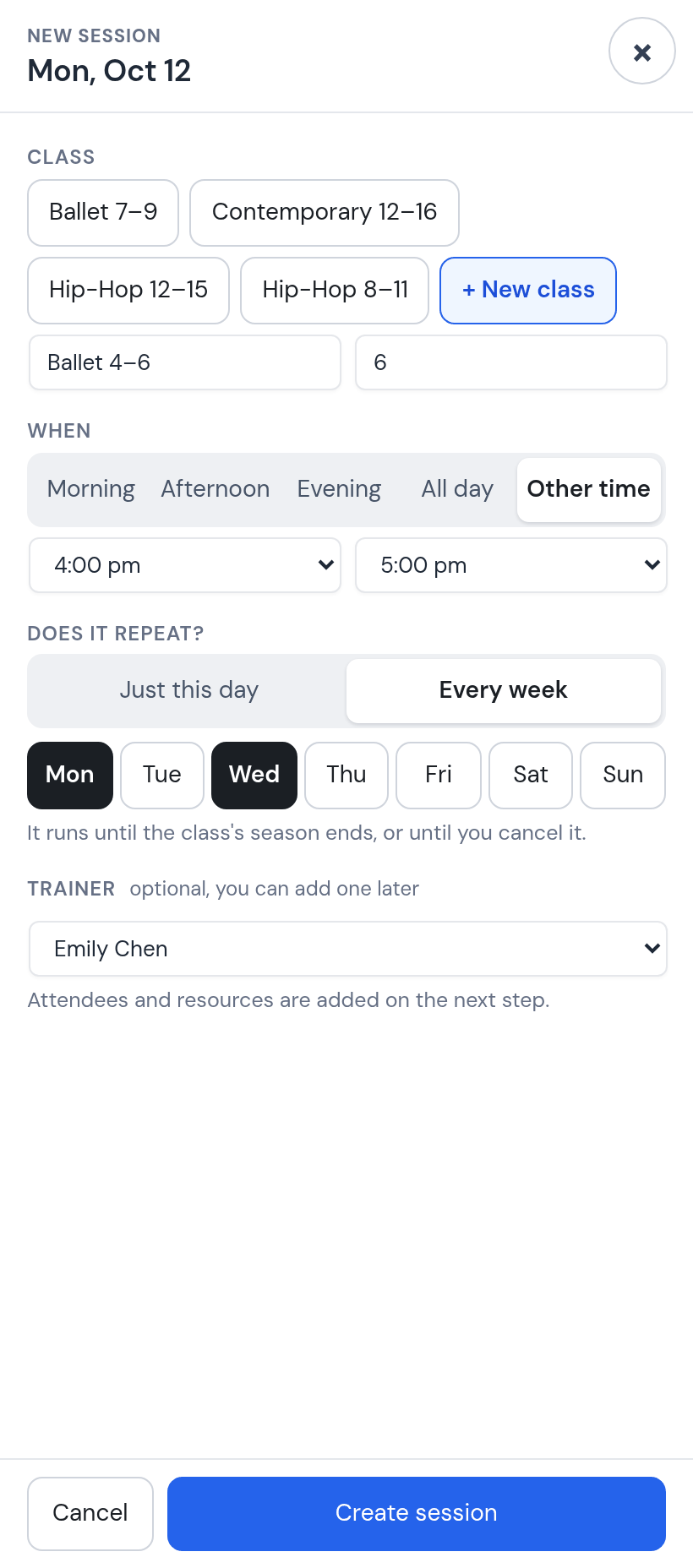
Open Trainer week and click Monday at 4 pm: New session opens with the hour set. + New class, the name Ballet 4–6 and six places: a place is a child, and the seventh parent who asks is told the class is full. Every week, Monday and Wednesday, teacher Emily Chen, Create session. One form makes the whole term: every Monday and Wednesday at 4 pm until the term ends or you cancel the class.
One class, one form.
2. Its room, then the children: a name, a parent’s phone and e-mail
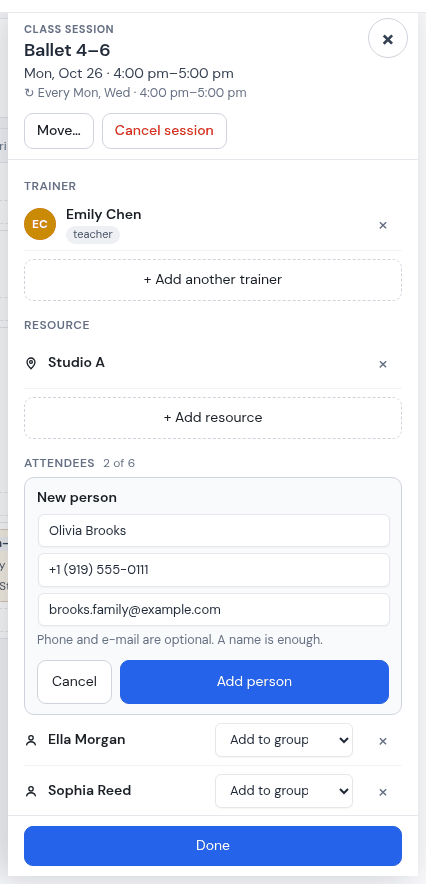
The new session opens. Under Resource, type “Studio”: every room shows whether it is free at that hour, and Studio A is held for the class with one click. Then the children. Type a name nobody has yet and New person opens: the name, the parent’s phone and the parent’s e-mail. The phone gets the reminders and the receipts. The e-mail gets the weekly schedule, which goes by e-mail or WhatsApp and never by text, so a family with only a phone number does not get it.
Olivia Brooks, Sophia Reed, Ella Morgan: three of the six places. Done asks once, not once per child: only this Monday, every Monday, or All upcoming sessions, which puts the room and the three children on every Monday and Wednesday of the term.
A child is a name, a phone and an e-mail. The e-mail is where the weekly schedule goes.
Why it matters. A room attached to a class is blocked for that hour. When Studio B is rented by the hour (Courts and rooms by the hour), the hours the classes use are simply not offered.
3. A wedding dance is a class of two, at its own rate
Megan and Josh Shaw are learning their first dance with Sarah every Wednesday at 7 pm until the wedding. It is made the same way: a new class, two places, every Wednesday, Sarah, Studio A; both are added on the same phone. Its price is on the class’s own page (Products, in the Full menu): Class Wallet: Hourly Rate $45 an hour each. Empty means the studio’s default, $18 an hour.
The class’s own hourly rate. Empty means the default.
PART 02
Monday morning: the week
Six steps on the week ahead: who covers, where a class goes when its room is rented, who is new, the couple lessons, the schedule.
4. The week ahead
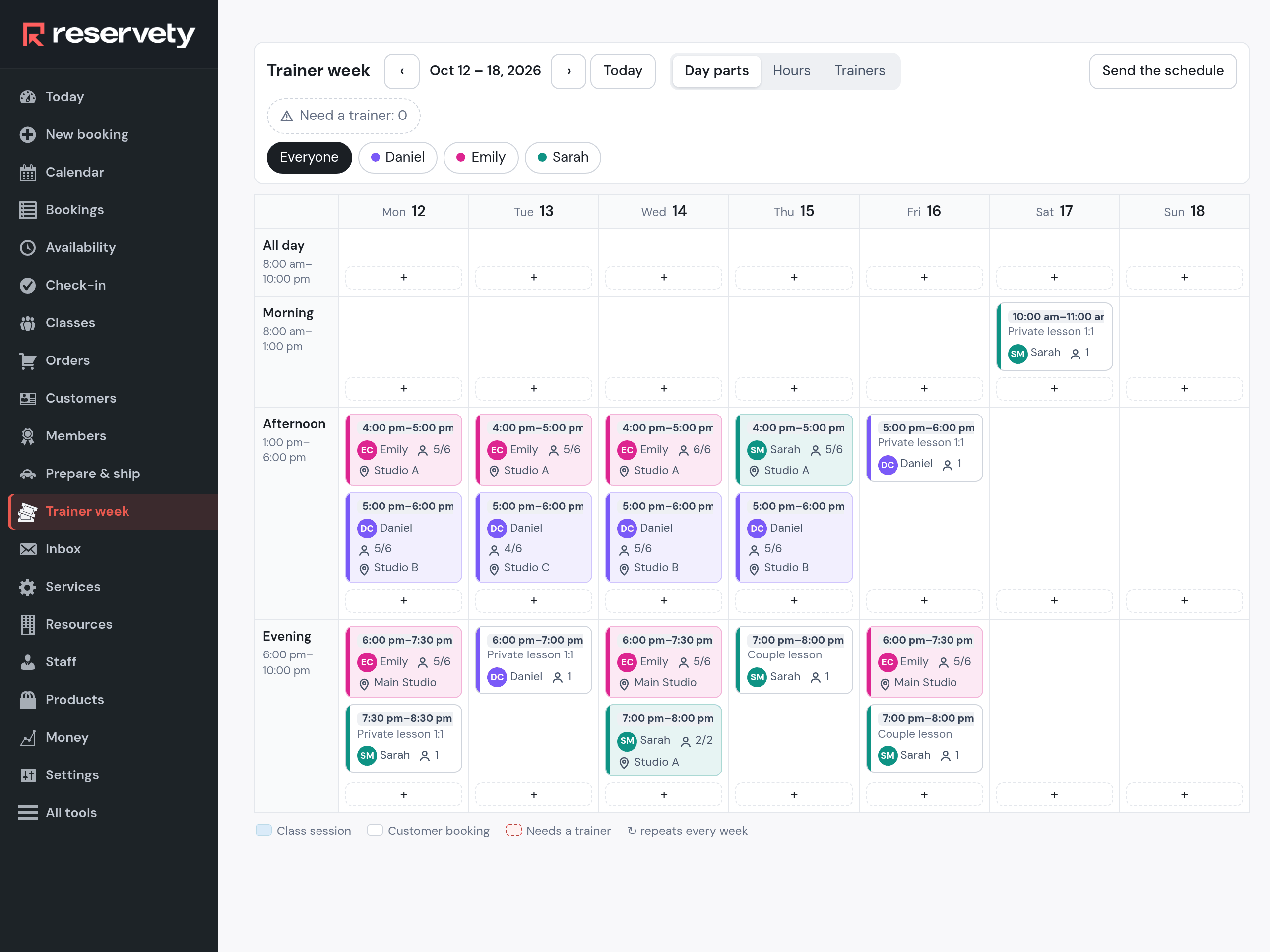
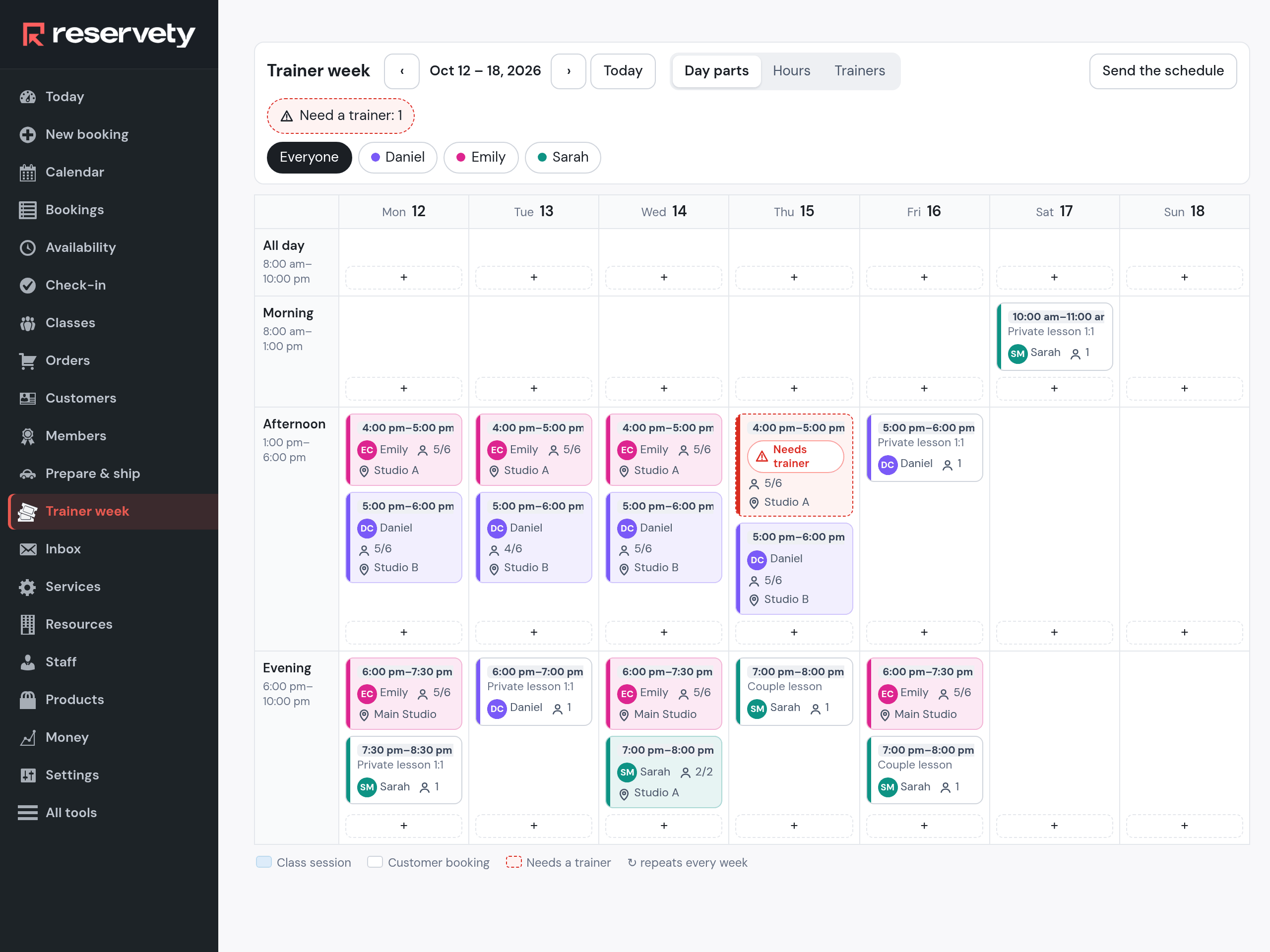
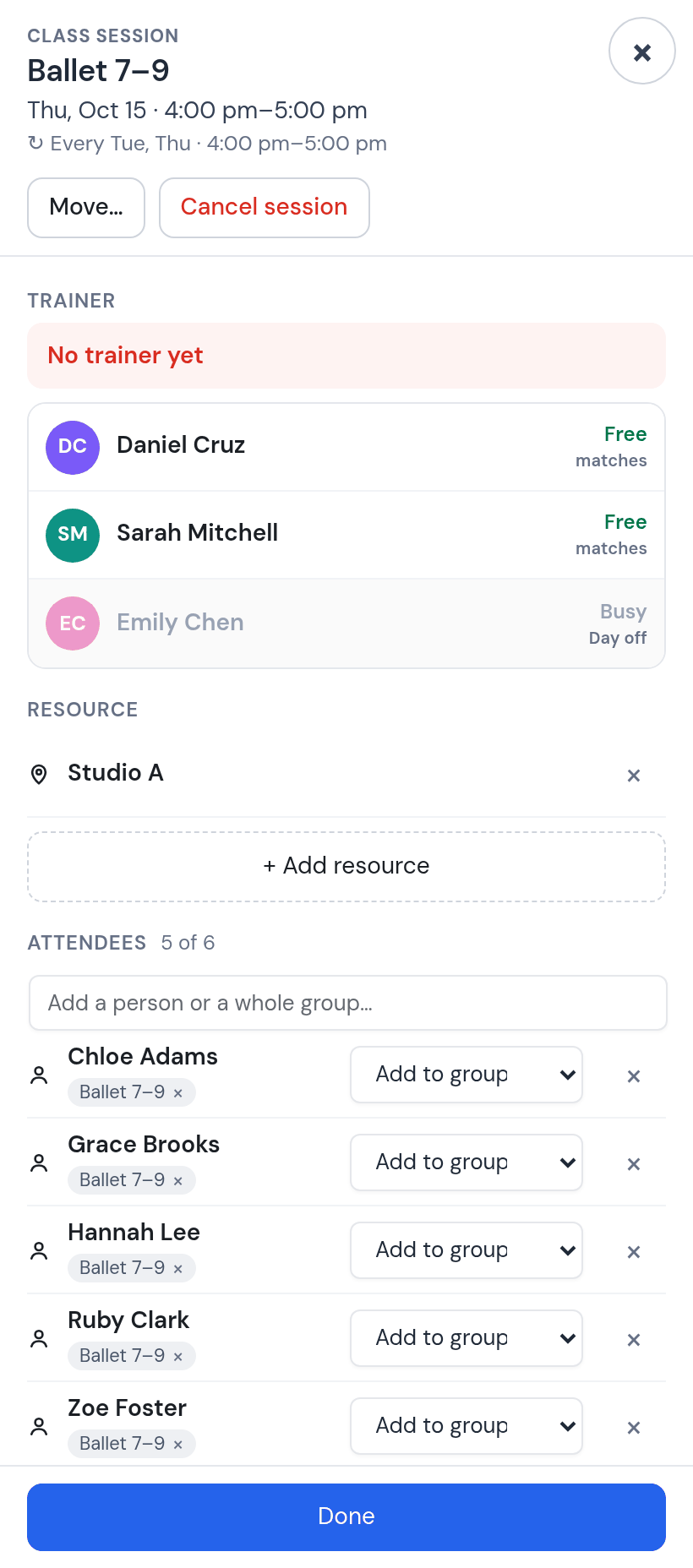
The other four classes are made the same way: Ballet 7–9 on Tuesday and Thursday with Emily, Hip-Hop 8–11 and Hip-Hop 12–15 with Daniel at 5 pm in Studio B, and Contemporary 12–16 with Emily in the Main Studio on Monday, Wednesday and Friday, 6 to 7:30 pm. Monday morning, everything is on one screen: the classes by day and time, the private and couple lessons as bookings, and in red what needs you. This week: Thursday at 4 pm has no teacher, because Emily is off that day. Robert Hayes has his ballroom private with Sarah on Monday at 7:30.
Red is the to-do list. Click the image to enlarge.
5. Emily is off on Thursday. Sarah covers, that Thursday only.
Open the Thursday card. The teacher list says who is free and who is not: Emily is Busy, Day off. Pick Sarah, then answer Only Thu, Oct 15. Next Thursday is Emily’s again.
Who is free.
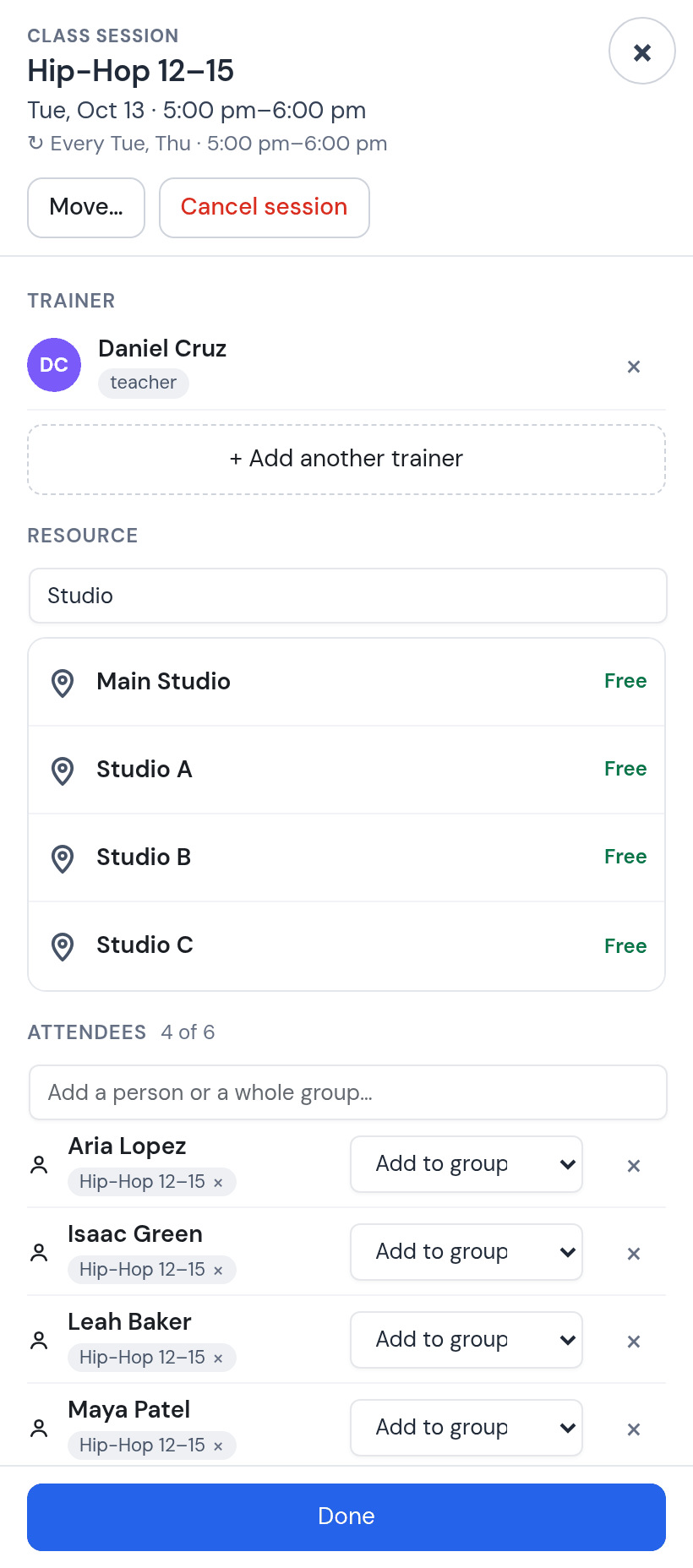
6. Studio B is rented on Tuesday evening. Hip-Hop 12–15 moves to Studio C.
A choreographer wants Studio B on Tuesday from 5 to 7 pm for an audition. Open Tuesday’s 5 pm card, remove Studio B, add Studio C, and answer Only Tue, Oct 13. Studio B is free for that evening and can be rented by the hour (Courts and rooms by the hour); Thursday stays in Studio B.
Where to?
7. A new child from Wednesday. The class is full.
Harper Diaz joins Ballet 4–6. Open Wednesday’s card, type her name and her parent’s phone, Done, All upcoming sessions. Six of six: the class is full from Wednesday.
Six of six.
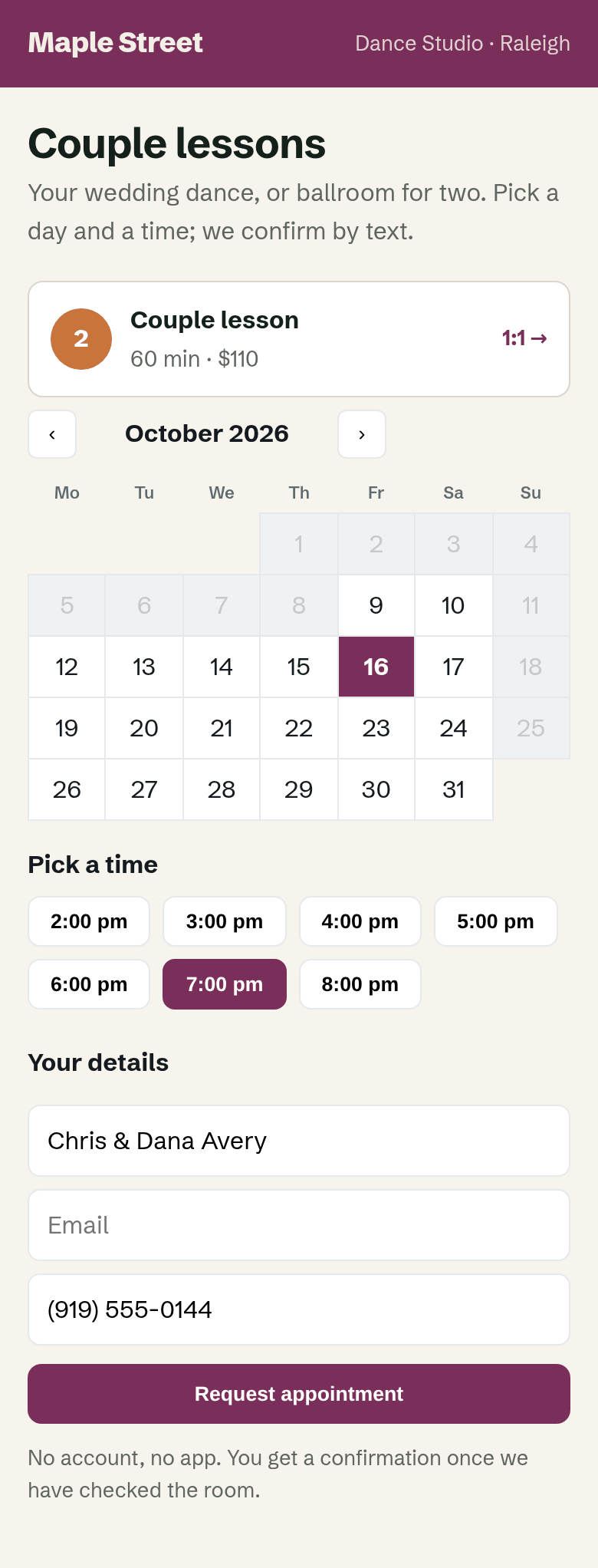
8. Couple lessons: the couple picks a time on your page, you confirm
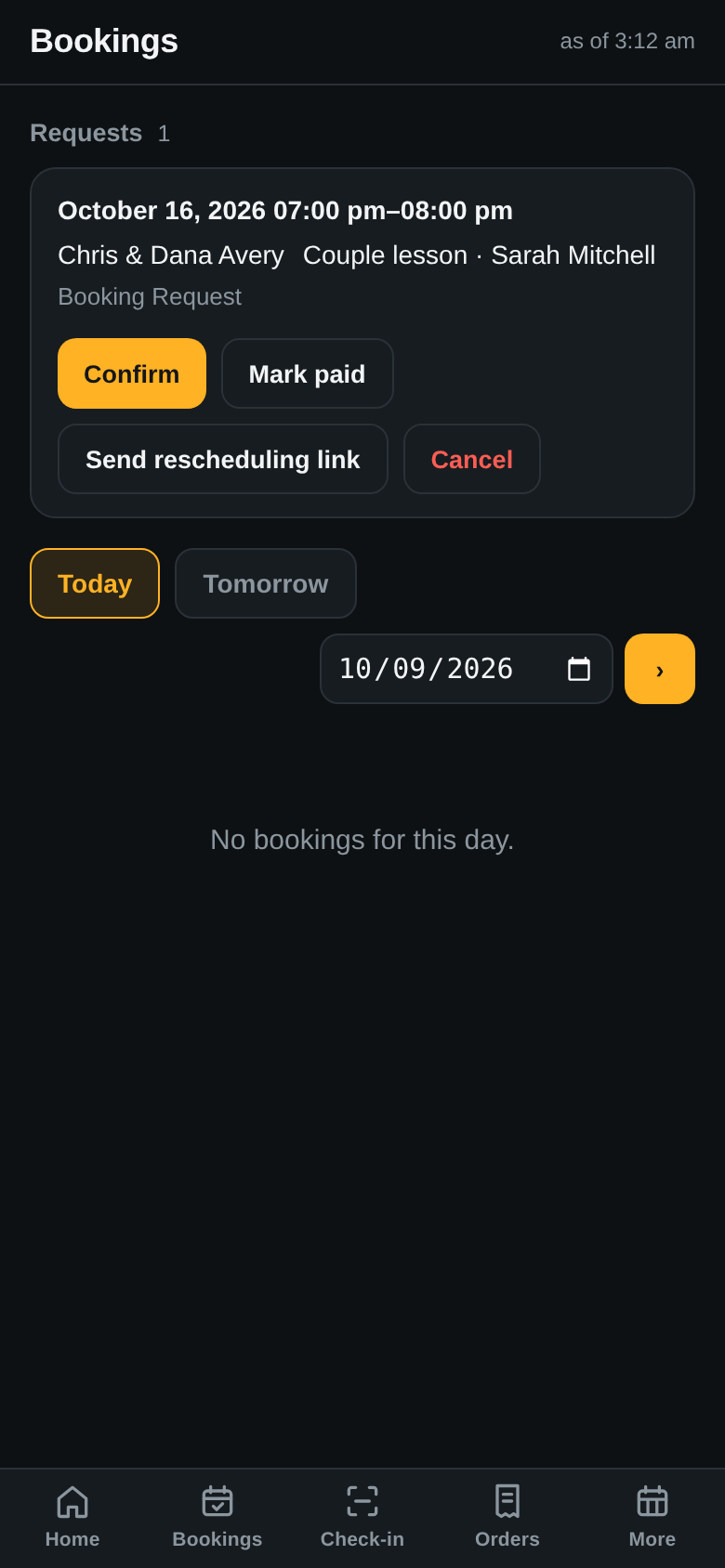
The studio’s page has a booking box for couple lessons: a day, a free hour, a name and a phone, no account and no app. Chris and Dana Avery ask for Friday at 7 pm. The request lands in your app; Confirm, and they get a text.
The booking page. The widget is the real one; the page around it was drawn for the guide.The request on your phone.
Rescheduling.Send rescheduling link texts the couple a page where they move the lesson themselves, up to four hours before.
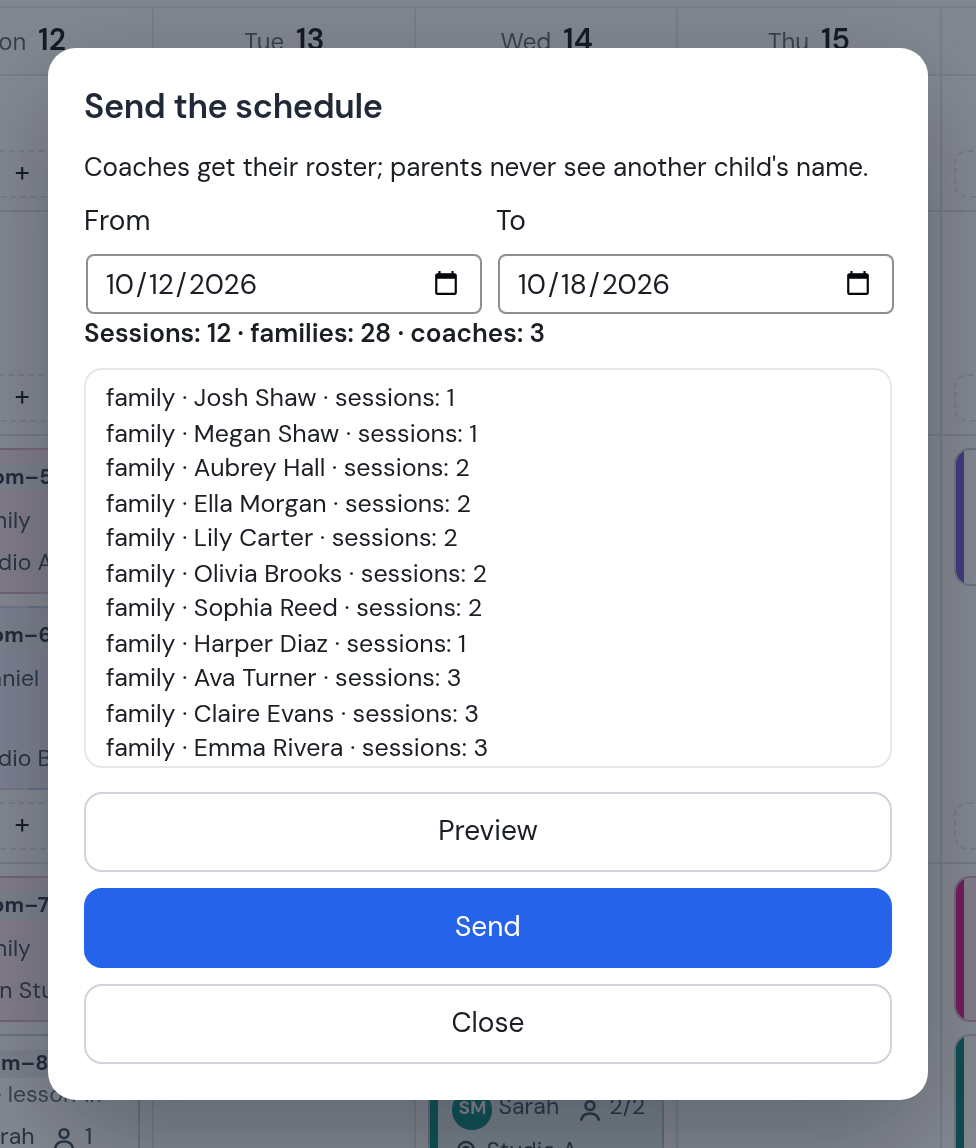
9. Send the schedule: one e-mail per family, one per teacher
Send the schedule previews who gets what: 12 classes, 28 families, 3 teachers. Each family gets only its own child’s classes; each teacher gets their classes with the names of the children.
Teachers get their class lists; parents never see another child’s name.
PART 03
Parents: registration and messages
What reaches a family during the week, and what they can do without calling the studio.
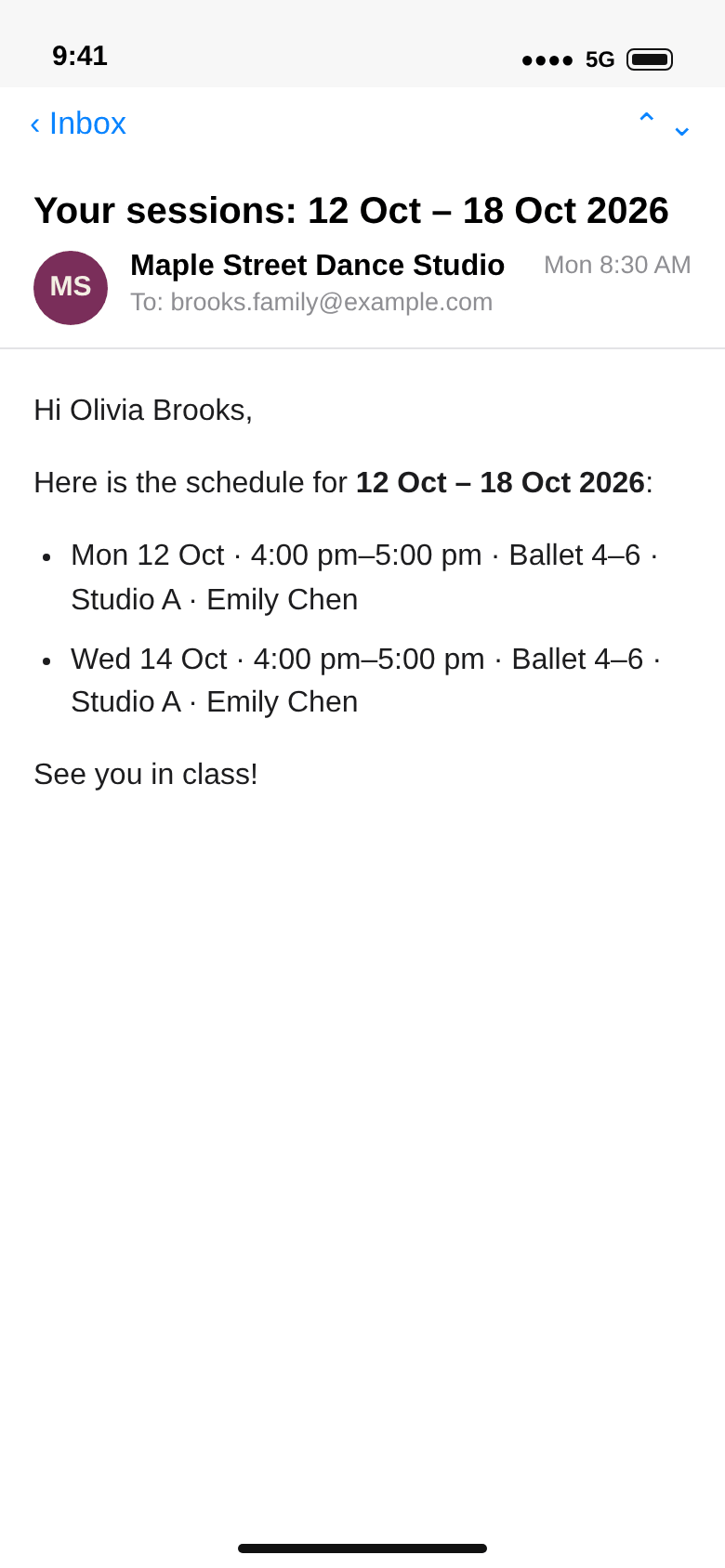
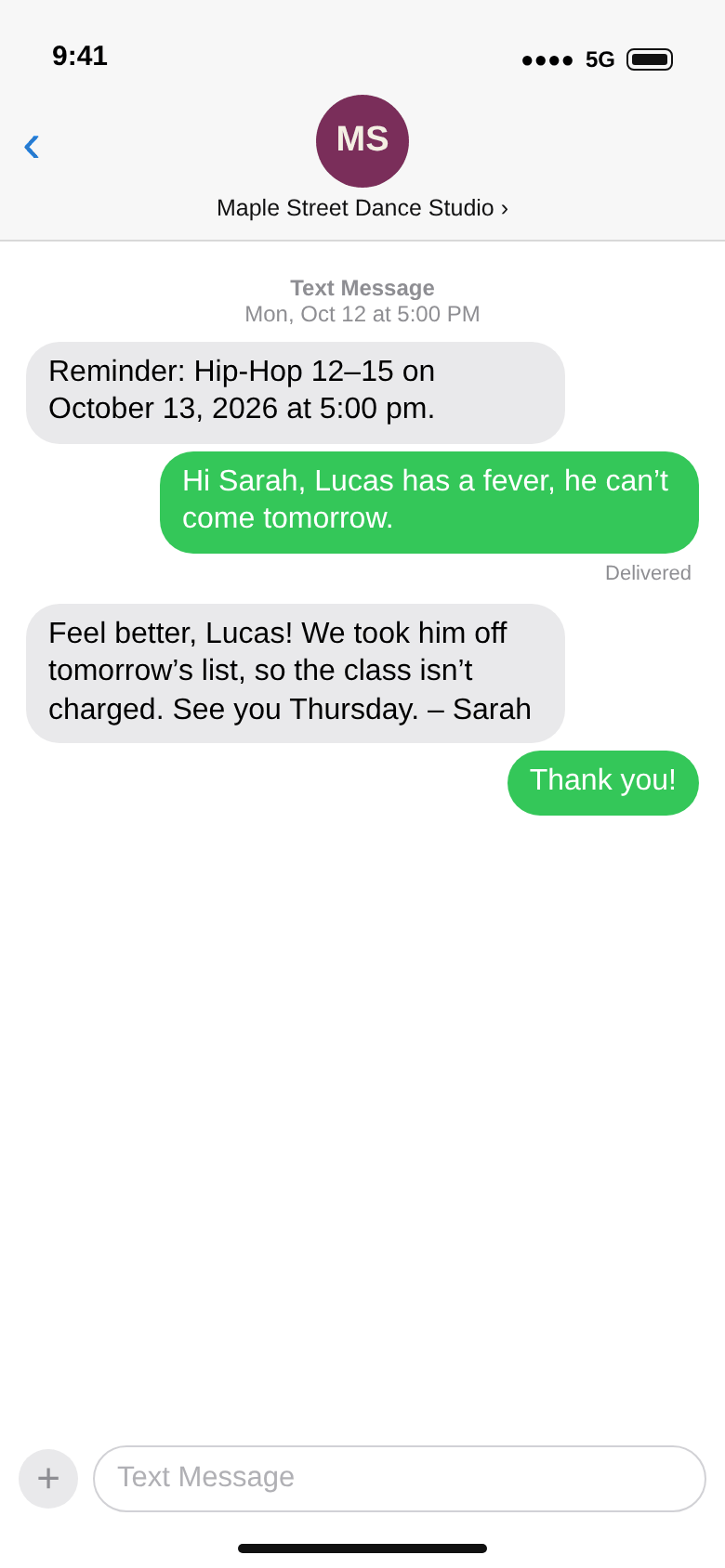
10. Monday, the week by e-mail; the day before, a reminder by text
The Brooks family gets Olivia’s week: Monday and Wednesday at 4 pm, Studio A, with Emily. Daniel gets his own week, Tuesday in Studio C included, with the children’s names. Twenty-four hours before a class the parent gets a text. Lucas’s parent answers that he has a fever. Sarah takes him off Tuesday’s list in Trainer week: a class a child does not attend is not charged.
The family’s copy.The reminder is the system’s text; the replies were written for the guide.
Text and e-mail. Reminders go by text and by e-mail; the hours before are a setting (24 here, 3 for the teachers). The weekly schedule goes by e-mail or WhatsApp, not by text. A parent who never gave an e-mail address still gets the reminder and the receipt by text.
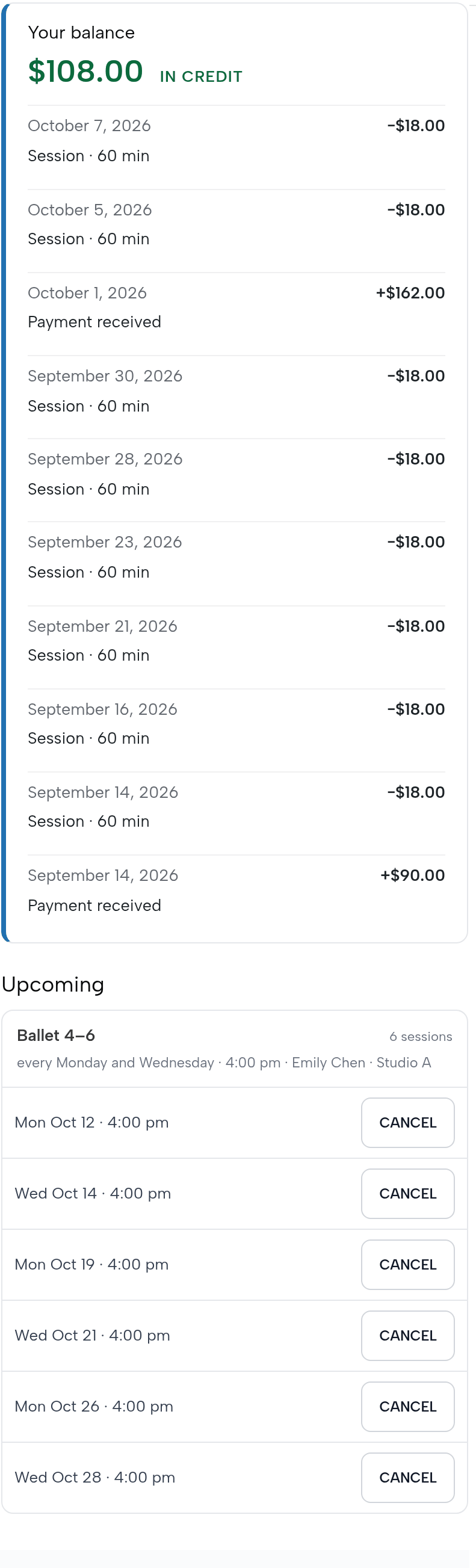
11. The parent’s own page: balance, payments, classes
Logged in, a parent sees the child’s balance with the two monthly payments and every class behind it, and the classes ahead. Cancel works until four hours before; after that the place stays booked.
How a parent gets in: the child’s account carries the e-mail typed in step 2. On the studio’s sign-in page the parent taps Reset Password, gets a link by e-mail and sets a password. The classes ahead show for a child who is in a group: in Trainer week, the child’s row has Add to group.
Balance, history, classes ahead.
12. Registration from the class’s link
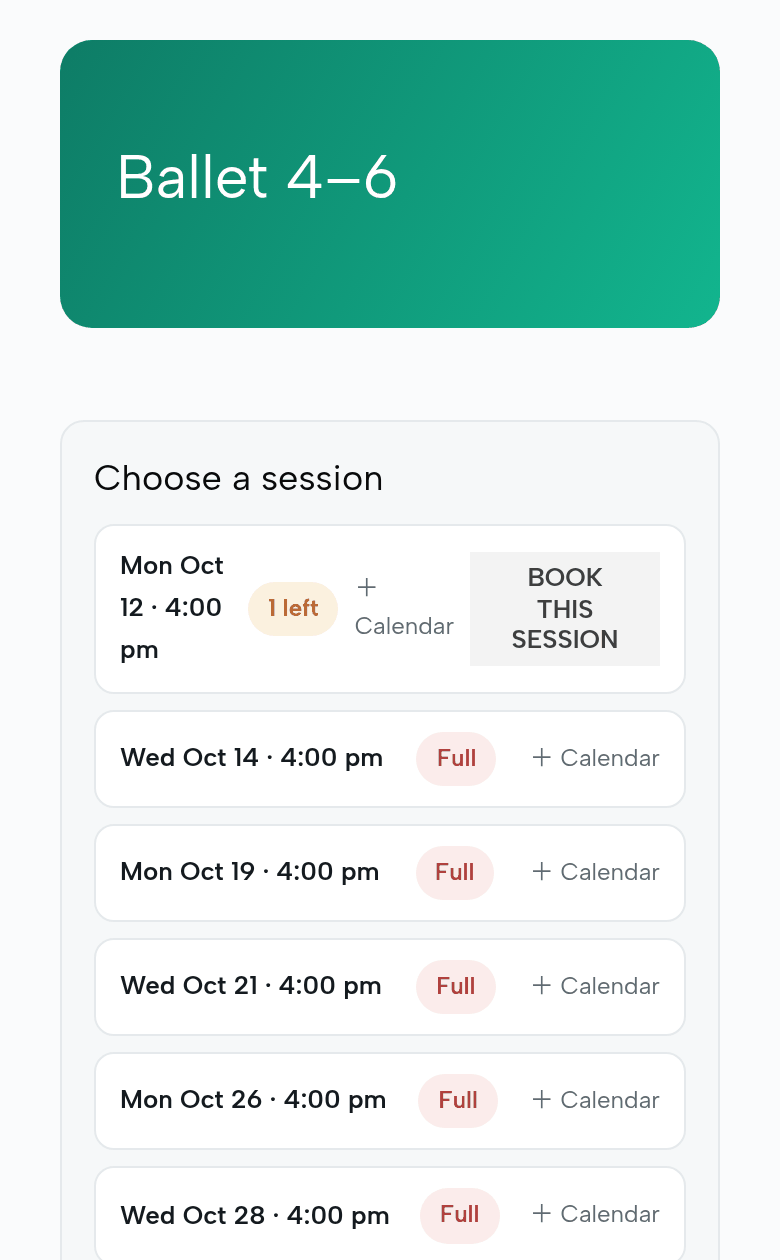
Each class has a page reached by its link (it is not listed in the shop). A parent sees the places left class by class and books a trial. Ballet 4–6 has one place left on Monday; from Wednesday it is full, because Harper took the sixth place.
Places left, then Full.
One class at a time. Online, a parent books one class at a time. Registering a child for the whole term is done by you or a teacher, as in step 2.
PART 04
Tuesday, 5 pm: Daniel in Studio C
The teacher’s side, on his phone. He sees his own week and his classes; he cannot see prices, other teachers’ weeks, or the shop.
13. The app on his phone: install it, sign in
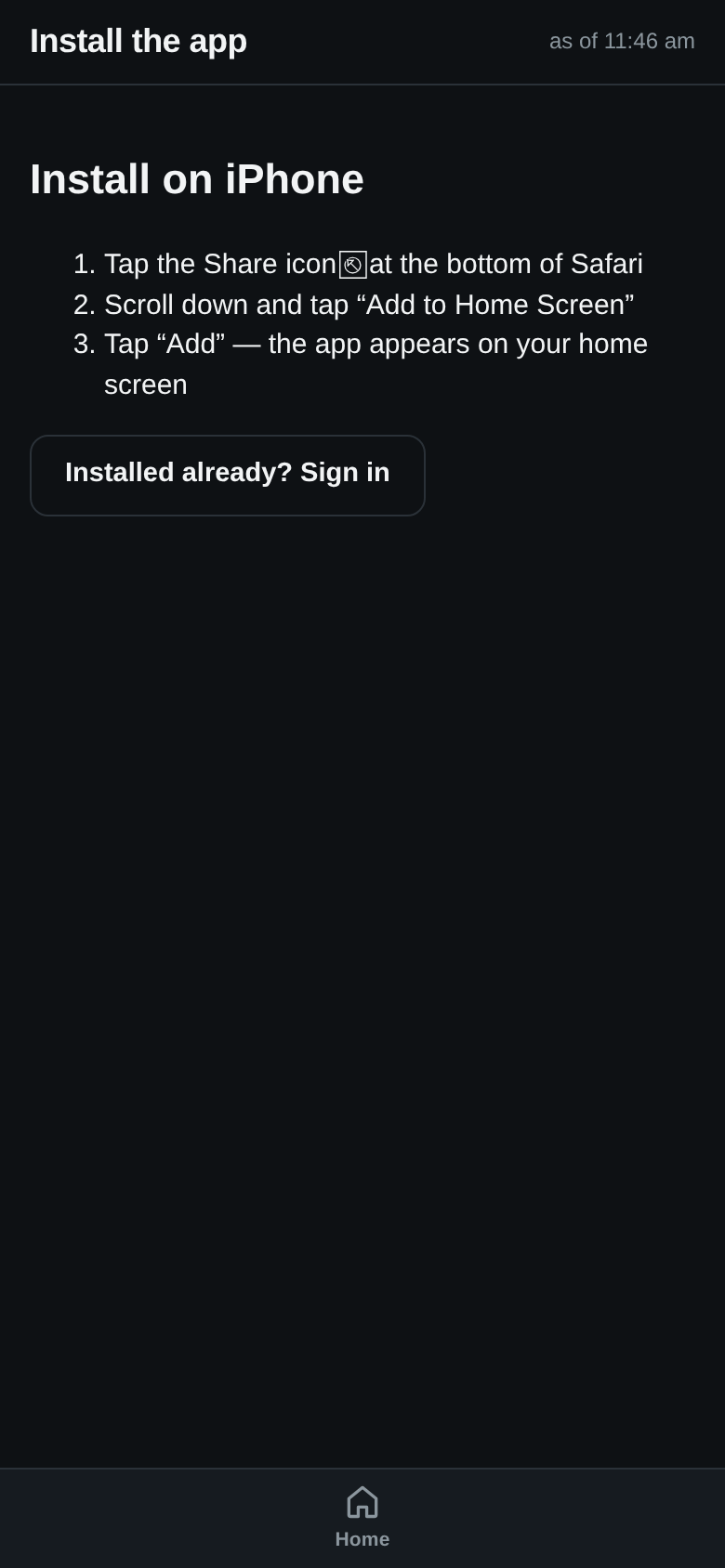
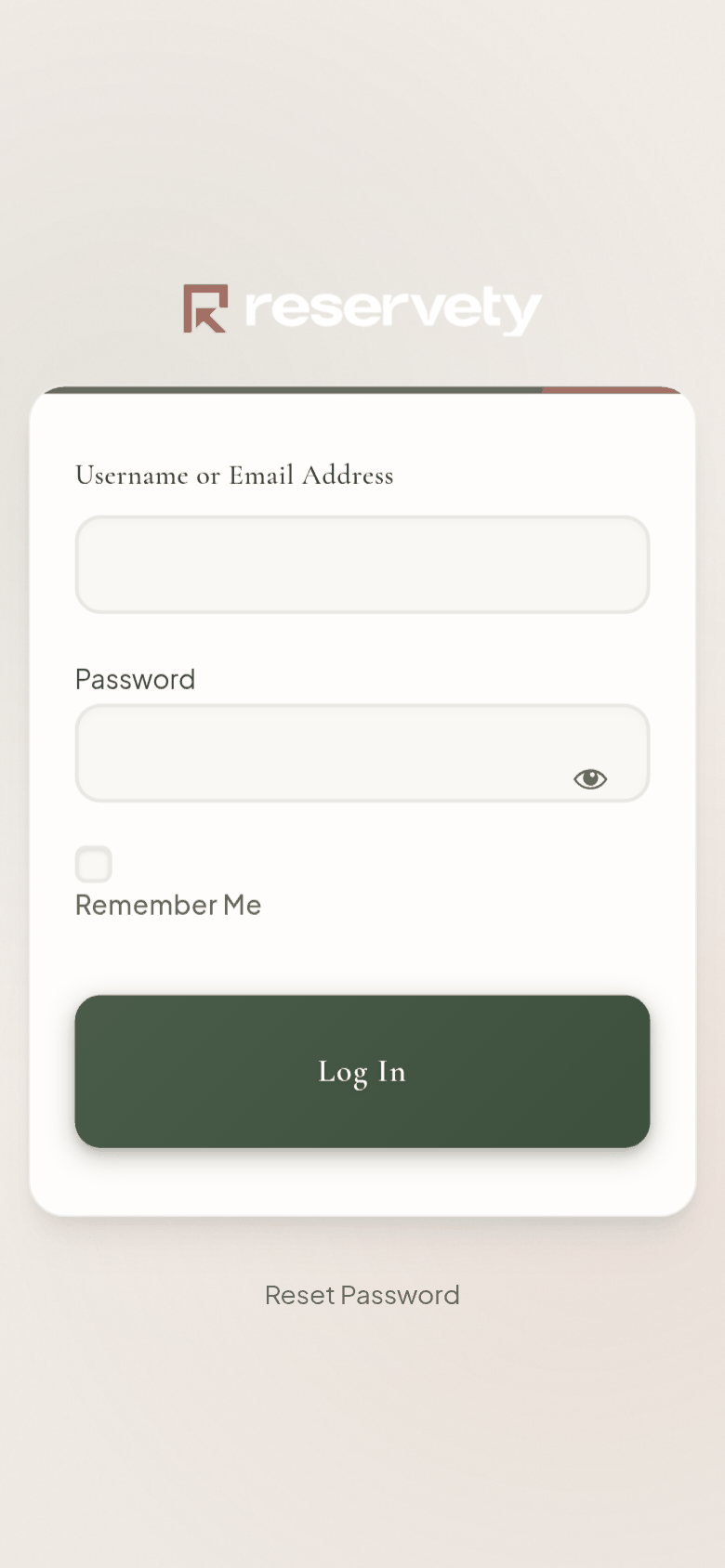
Daniel opens the app’s link, /bb-app/, on his phone. On an iPhone, Install on iPhone shows the three taps; on Android it is one button. The first time, he signs in with the e-mail you gave him under Staff. His account was made then, with a password nobody knows, so he taps Reset Password and sets his own.
Install. Three taps on an iPhone.Sign in. The first time: Reset Password.
14. Enable notifications
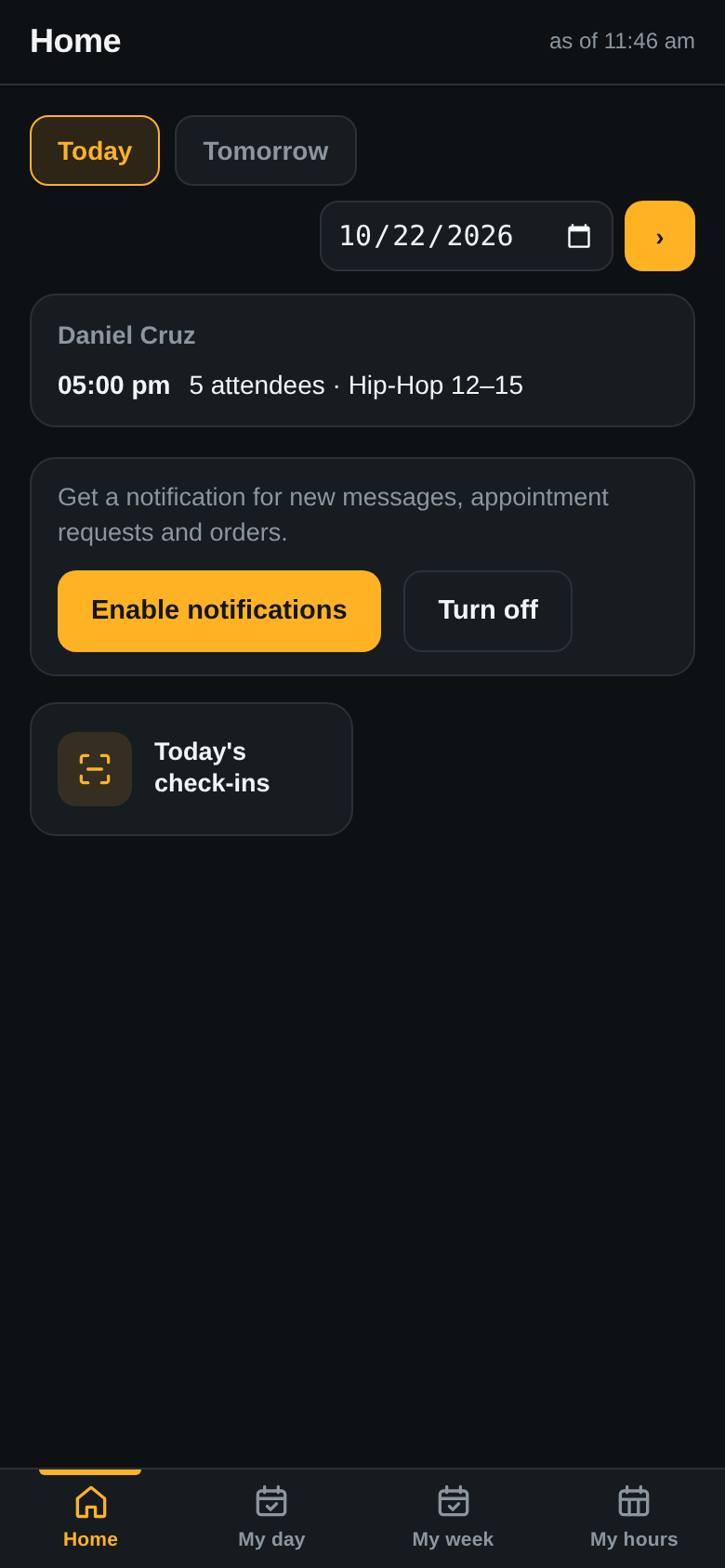
On the app’s home, Enable notifications, and allow it when the phone asks. New messages, appointment requests and orders then arrive like a text, even with the app closed. Turn off stops them on that phone.
One tap, once per phone.
15. His week, his day
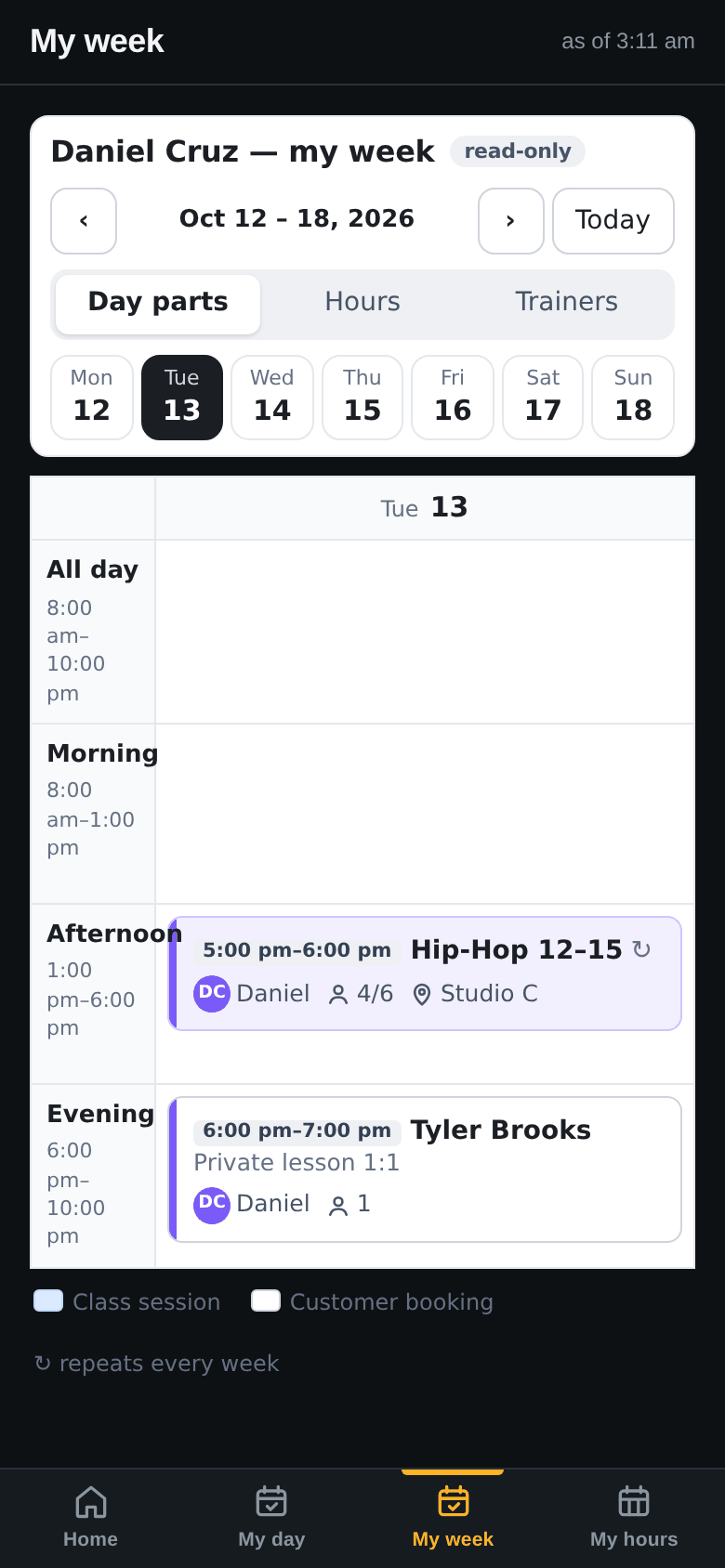
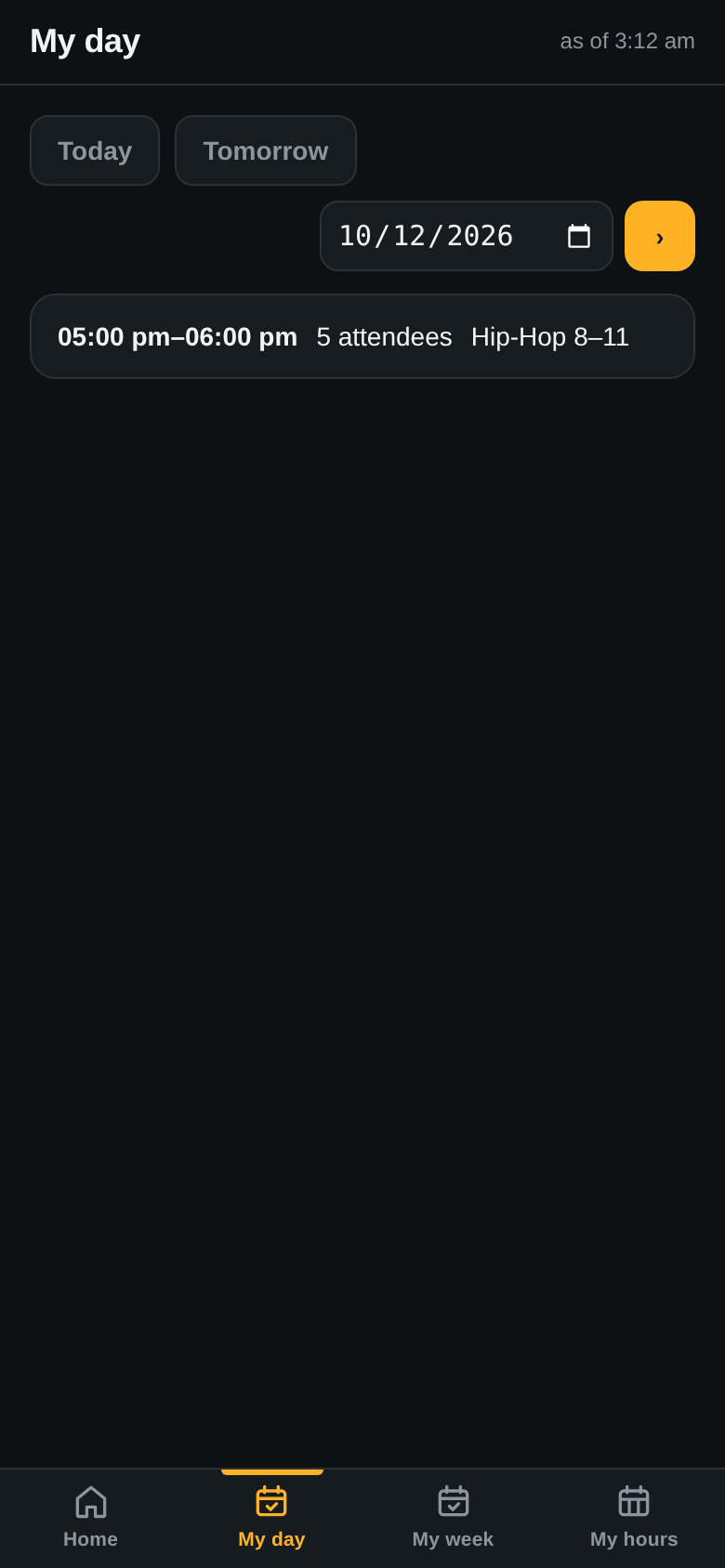
My week shows Tuesday at 5 pm in Studio C; My day lists Monday.
My week.My day.
16. Attendance: one tap per child
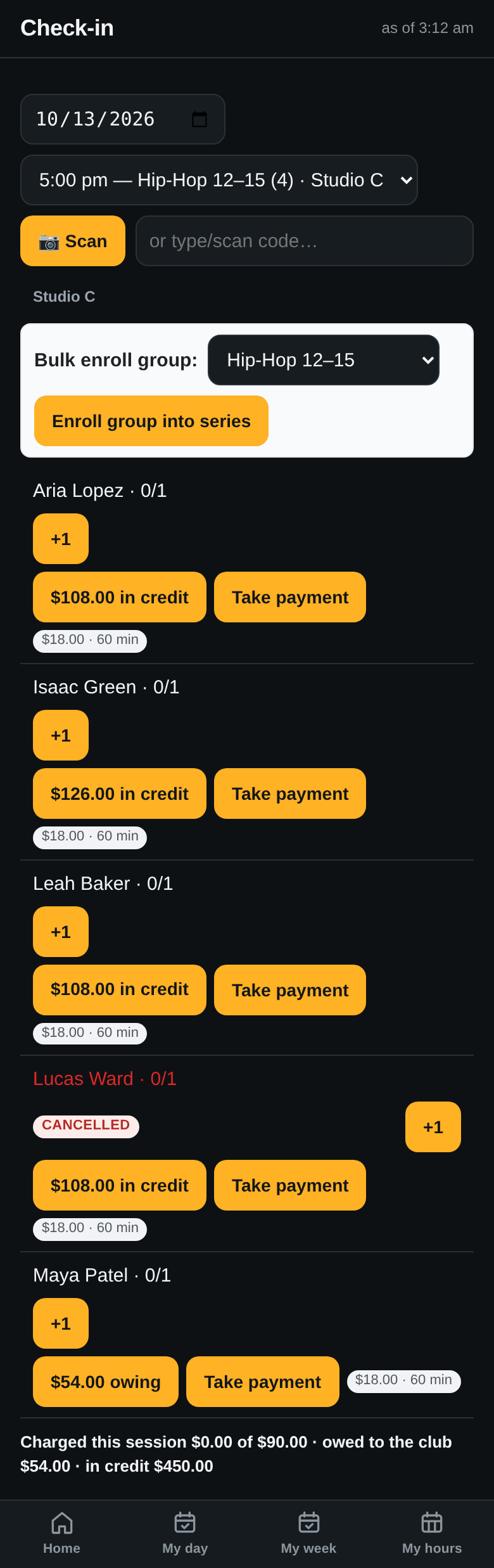
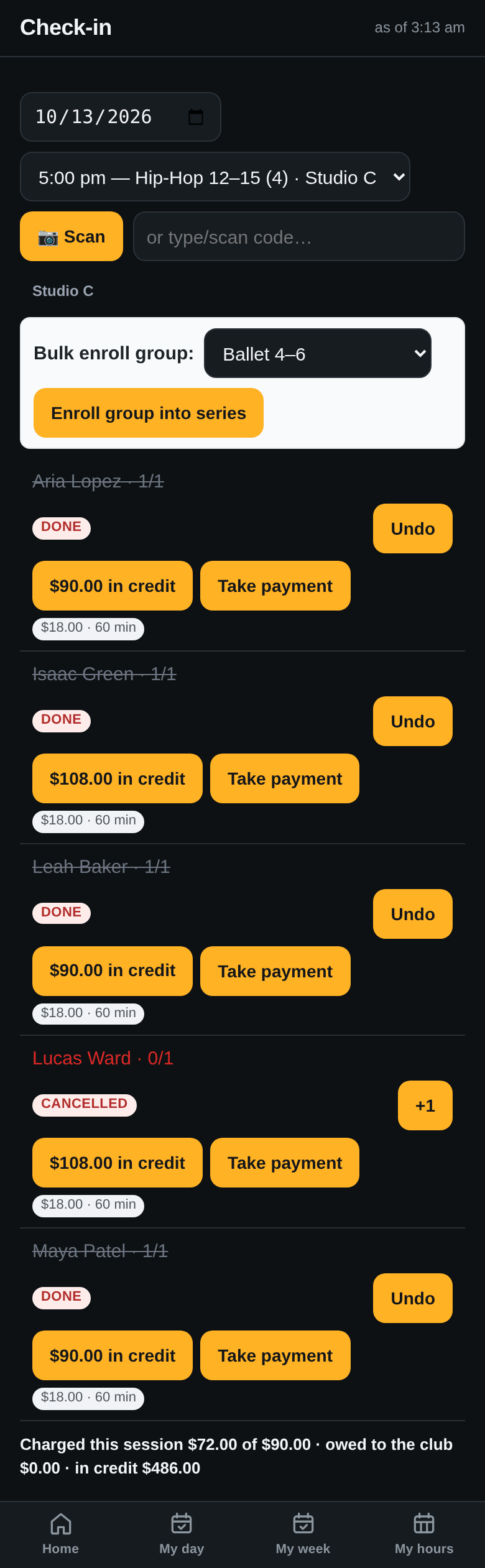
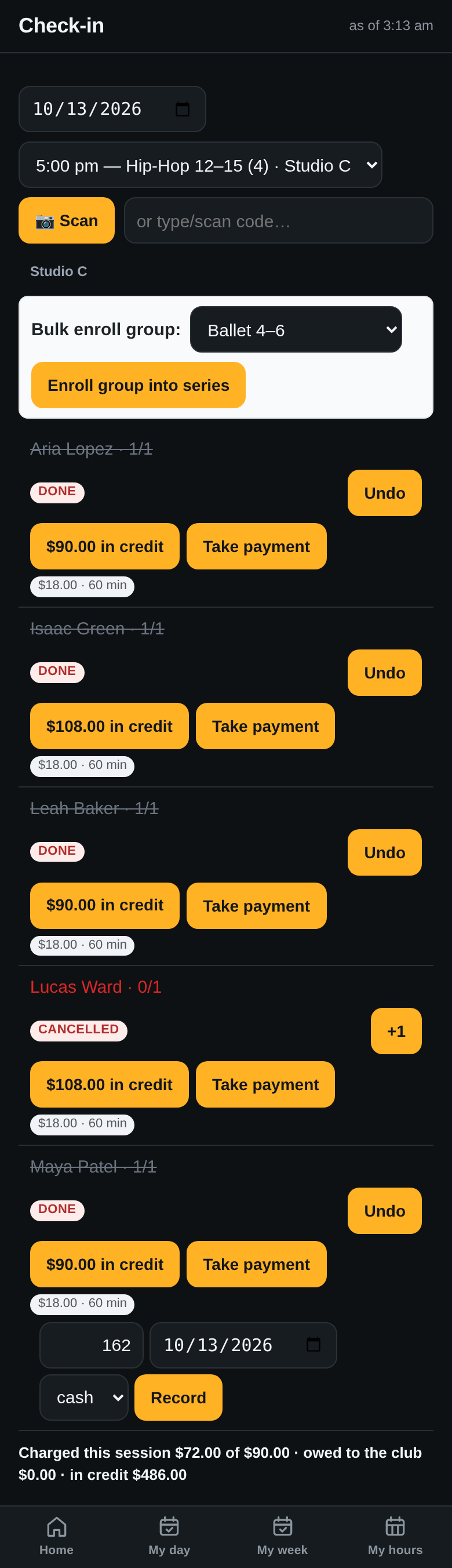
The class list shows the children coming, each with their balance. One tap each: present, and the class is charged. Lucas is shown as cancelled and is not charged.
Before.After. Maya’s balance already includes the October payment in step 17.
17. Maya’s mom pays October in cash. Take payment.
On Maya’s row, Take payment: $162, the date, cash. Her balance goes from $72 owing to $90 in credit, and her parent gets a receipt by text. The $162 is now money Daniel holds for the studio; it comes off what the studio owes him (step 19).
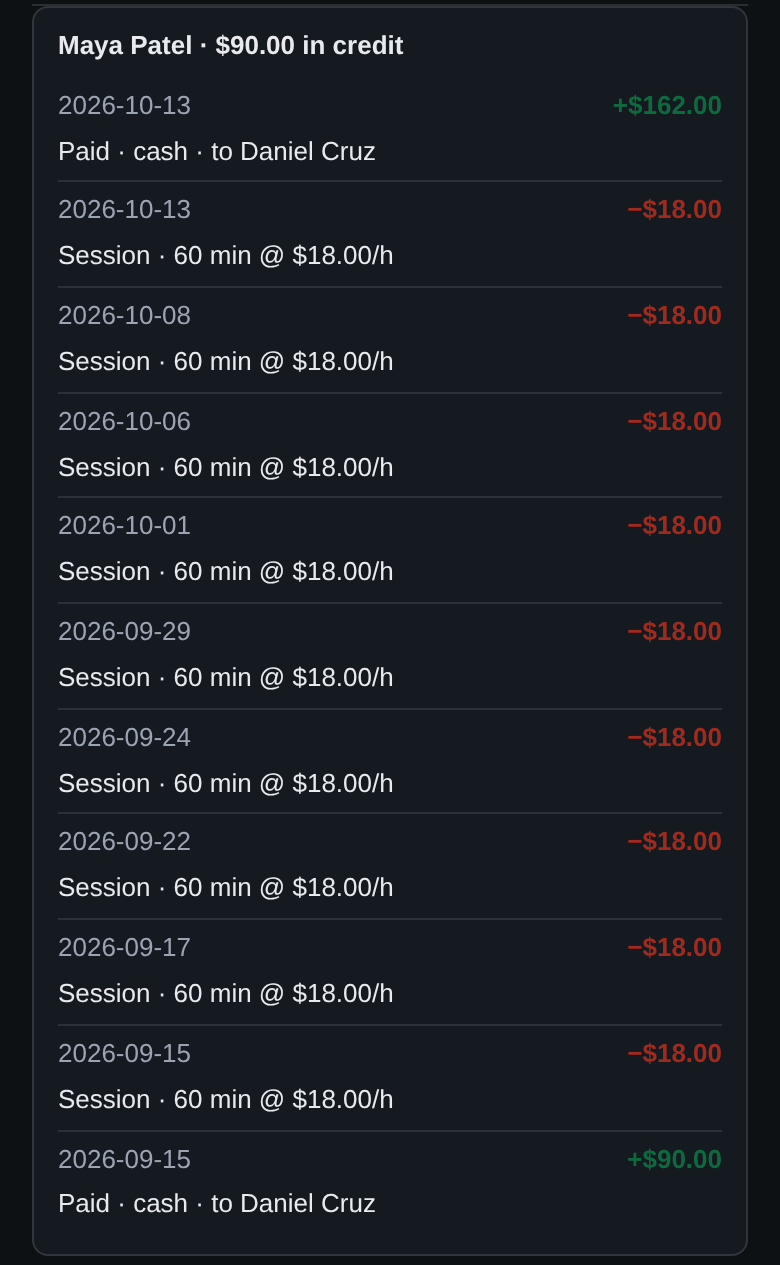
A tap on the balance opens Maya’s ledger: September’s and October’s payments, when and to whom, and every class with its length and rate. This is what you show a parent who asks why they owe.
Cash, recorded where it was taken.Paid, to whom, and each class at its rate.
PART 05
Tuition: who has paid October
Two screens: the families, and the teachers.
18. Who owes, how much, who took their last payment
Class Money for the week: $162 collected, $54 owed to the studio, $2,250 held in credit. The Hills have not paid October: Jayden’s line says how much, when they last paid and to whom.
One family behind. Click the image to enlarge.
You make the call. There is no button that texts a family about a balance; you call or text them yourself, or set tuition to be charged to their card automatically every month. The receipt they get after paying is automatic.
19. Daniel’s settle-up: his classes, minus the cash he holds
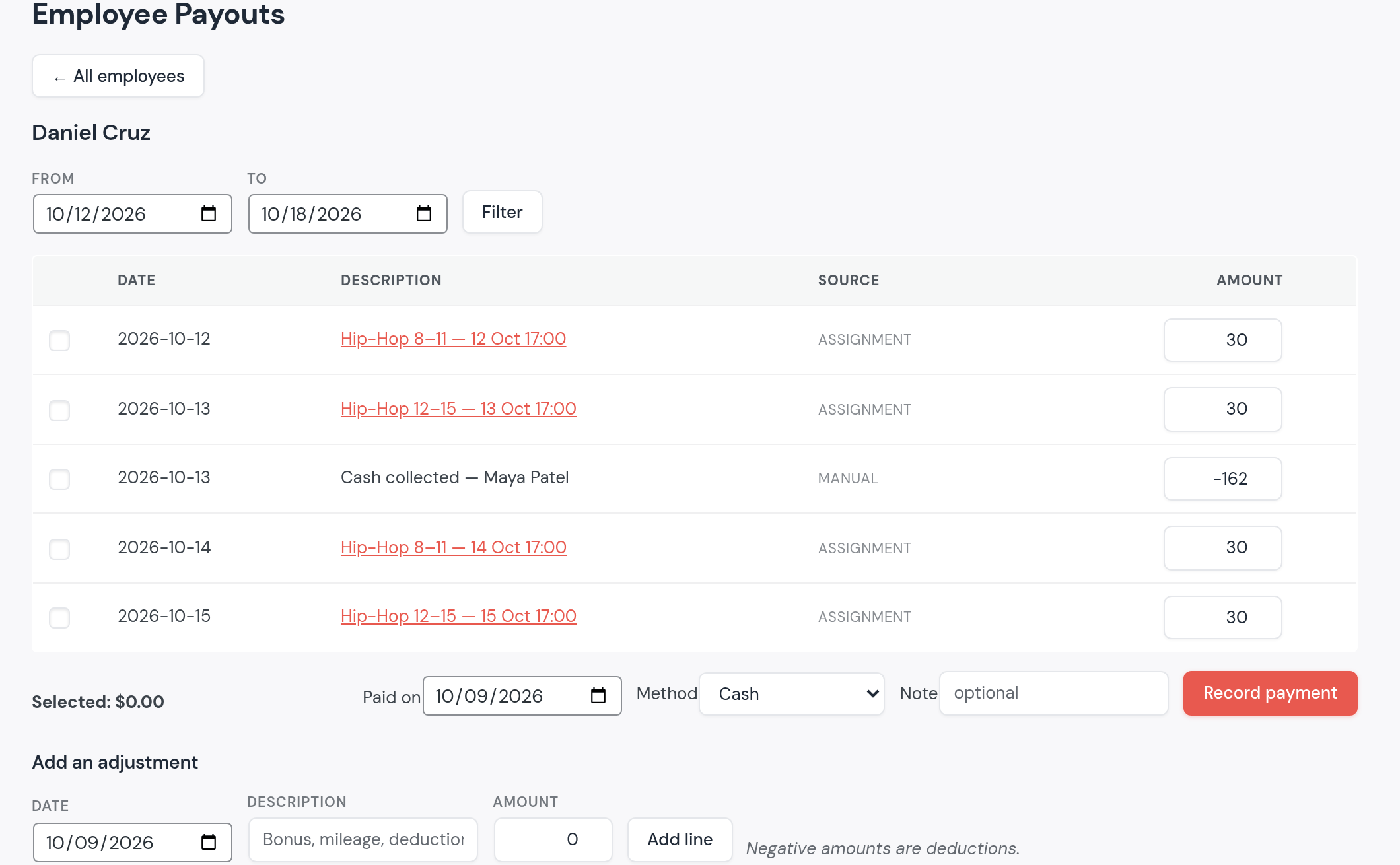
Each class Daniel taught is a line at $30. The $162 he took from Maya’s mom is a line of −$162. Pay him the total, or ask for the difference, and record it.
One ledger per teacher: what he is owed and what he collected.
PART 06
Later in the term
A make-up class, a look at who comes, a class that moves, a rehearsal for a whole group, a holiday, and the winter showcase.
20. A make-up class for one child
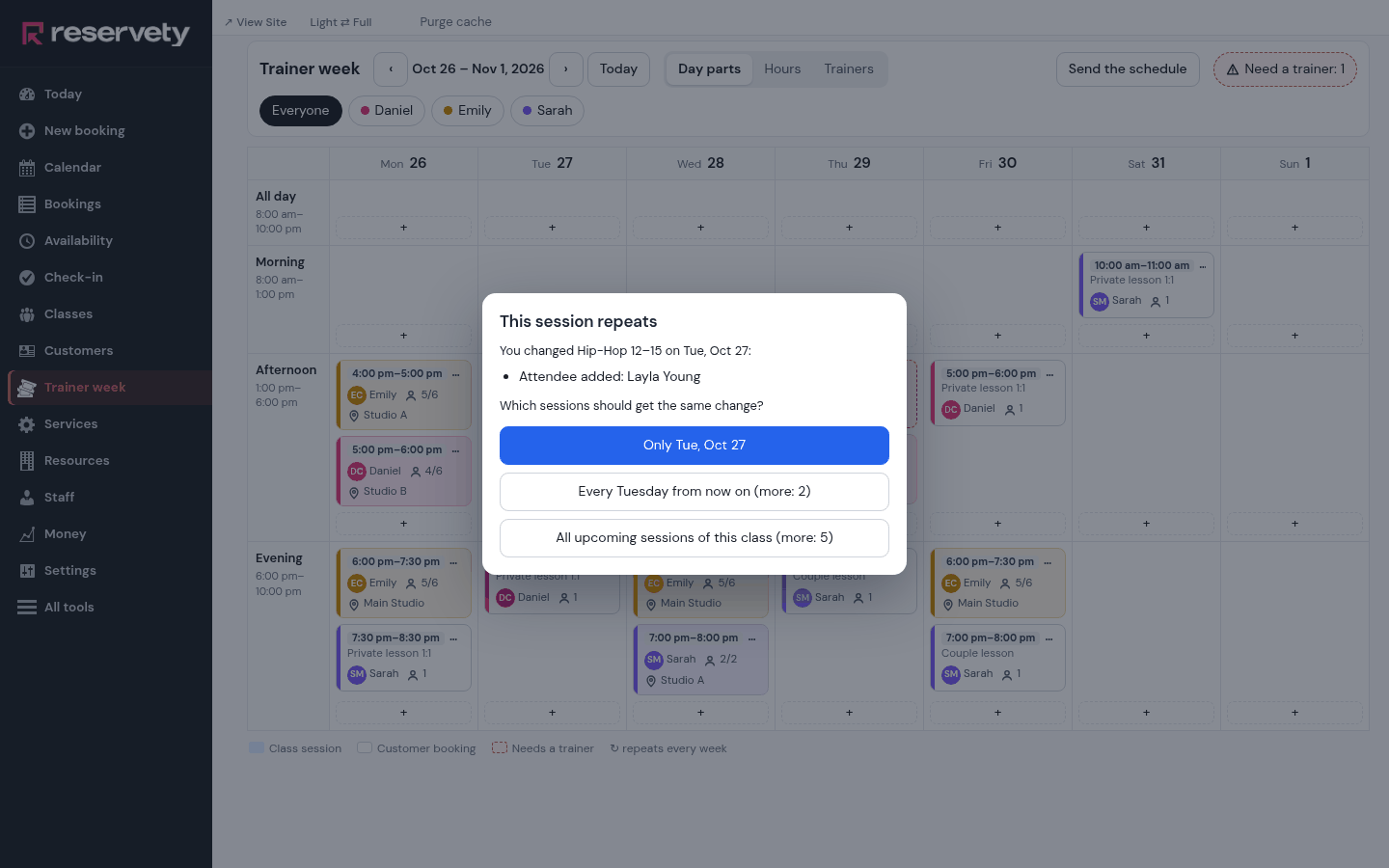
Layla can’t come on a Monday. Open Monday’s Hip-Hop 8–11, remove her with ×, Done, only that Monday. Then open Tuesday’s Hip-Hop 12–15, which has a place free, type her name and add her. Done asks again: Only Tue, Oct 27. Her wallet pays for the class she comes to, not for the one she missed.
One day only.
21. Who comes, and who has stopped coming
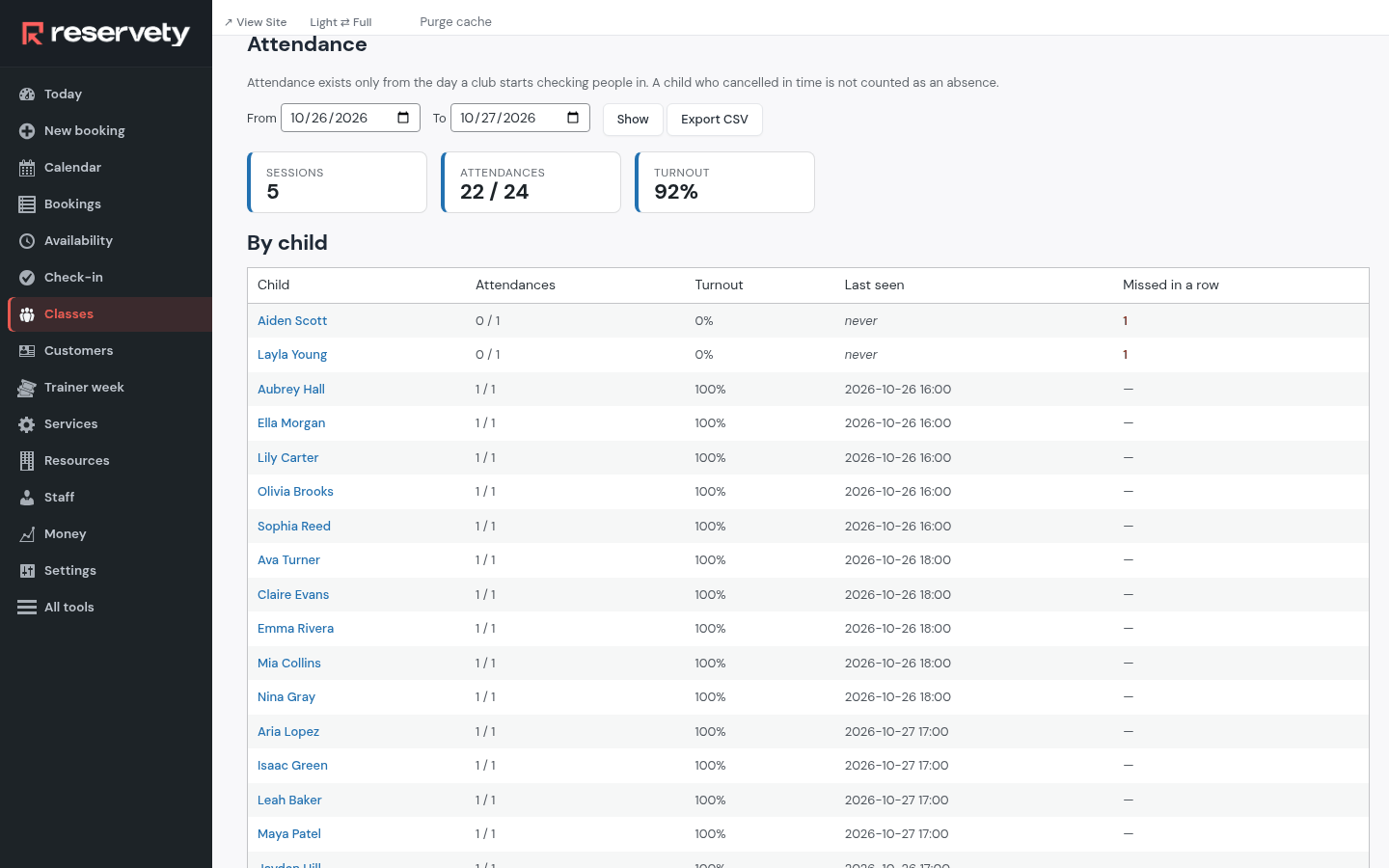
Attendance (Full menu) counts the check-ins class by class for the dates you choose, and the turnout. Under it, every child with the classes they missed in a row: the families to call before a child quietly drops out. Export CSV gives the same in a spreadsheet.
Turnout, and who is slipping away.
22. A class moves to another day
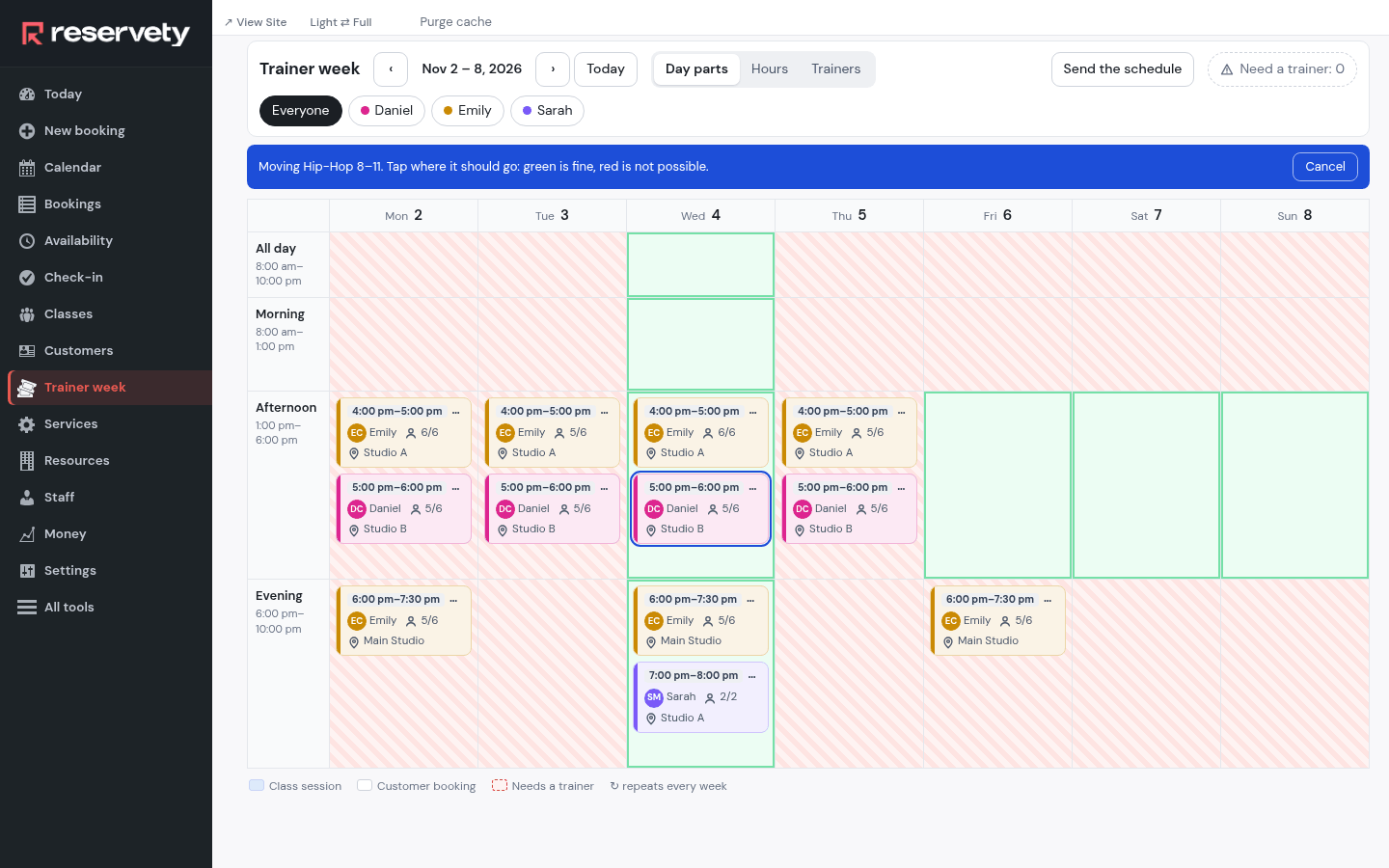
Open the class and click Move…: the week turns green where it can go and red where it cannot, because the teacher is busy, the room is taken or the class does not run that day. Tap the new place. A class that repeats asks once: Only this one, or All following too.
Green is fine, red is not possible.
23. A rehearsal for a whole group
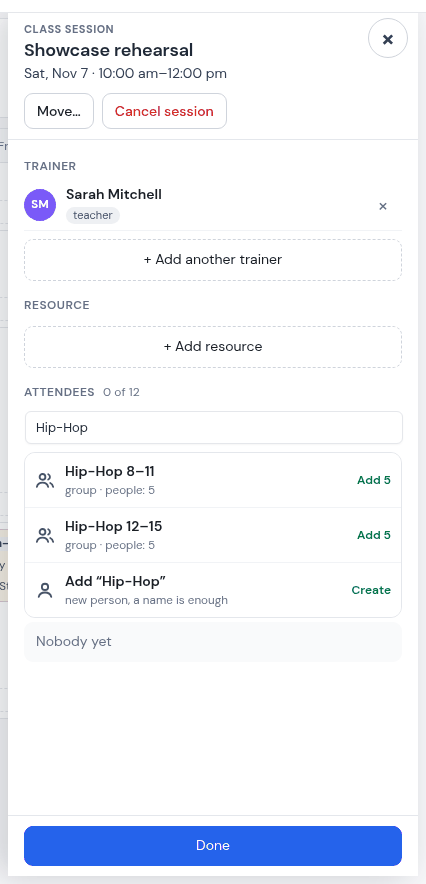
A showcase rehearsal on Saturday morning: a new session, Just this day, twelve places, with Sarah. In the attendee search, type “Hip-Hop”: each saved group shows with how many it adds, and one tap adds them all. A group is saved from any of its classes with Save these … as a group.
A saved group is one tap.
24. Veterans Day: the studio is closed
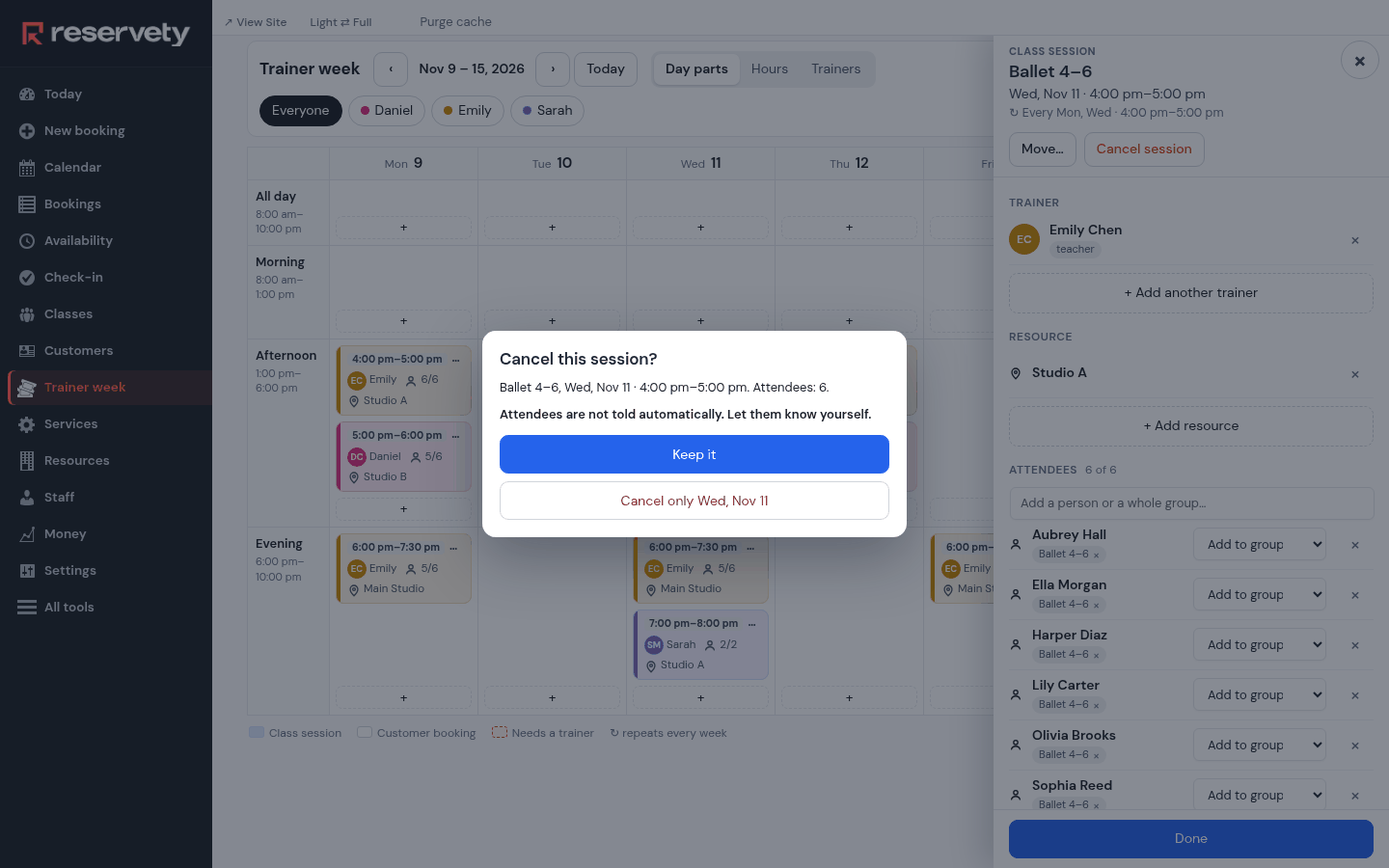
Wednesday, November 11: no classes. Open each class that day and click Cancel session, then Cancel only Wed, Nov 11. The class stays on the week, crossed out, and can be restored if plans change.
Cancelled for that day only.
Nobody is told. Cancelling a class does not message the families. Send them a note yourself, or the weekly schedule for that week, which no longer lists it.
25. The showcase page: child and adult tickets
The Winter Showcase is on Saturday, December 12 at 6 pm at the Oak Hall Theater: 120 seats, $8 a child and $15 an adult. Families buy from the studio’s page; five families have already bought 20 tickets.
One evening, two prices, one count of seats.
Not tied to the classes. Anyone with the link can buy tickets; they are not limited to the families of enrolled children.
PART 07
What it does not do yet
So nobody is surprised after the first month.
No family login. Each child is their own account; sisters and brothers share a parent’s phone, but a parent sees one child per login.
Online registration is one class at a time. A whole term is registered by you or a teacher. Class pages are reached by their link, not listed in the shop.
No reminder button for balances. Families pay into the wallet, or tuition is charged to their card automatically every month; nothing texts a family who is behind.
No waitlist for a pay-as-you-go class. A full class shows Full. A waitlist with automatic promotion exists only for members on a credit plan.
Showcase tickets are not tied to enrolment, and there are no assigned seats.
Prepaid credit does not expire, and there is no late-cancel fee: after the cutoff (four hours here) a parent simply cannot cancel.
The weekly schedule goes by e-mail or WhatsApp, not by text. Reminders and receipts go by both.
Teachers do not see their pay in the app, and pay is a flat amount per class, not per child.
No online classes: no video link on a class.
What this proves
A term is one form per class. A weekly class with a teacher and a room, made once; a wedding couple is the same form with two places.
Changes are one-offs or for good, and you say which. A day off, a room rented out, a new child: every change asks once.
The room is really held. A class’s room is not rented out at that hour, and a room someone rented is not given to a class.
Tuition is a balance, not a guess. Each child’s payments and classes in one ledger; the family that is behind is one line on one screen.
The showcase sells itself. Child and adult tickets on one page, sharing the seats.
Parents know without calling. The week by e-mail, a reminder by text, a receipt after paying, and a page with the balance and the classes.
Built on a test copy of a Reservety site set up as Maple Street Dance Studio, Raleigh, North Carolina, for the week of October 12, 2026. The studio, its teachers, the families, their phone numbers (555-01xx) and e-mail addresses (example.com) are invented; no card was charged and no message was sent. Every admin and app screen is the real system. Drawn for the guide: the text-message and mail frames around the system’s real texts and e-mails, the parents’ replies, and the studio’s couple-lessons page around the real booking widget.
Start Your Rental Business the Right Way
Reservety handles your website, bookings, inventory, and payments — so you can focus on growing your business.